

The best WooCommerce analytics setup is the one that ties revenue to the page, keyword and channel that produced it, without making you maintain a reporting stack. For most store owners and agencies, that is Cromojo: real-time revenue attribution down to the keyword, cookieless tracking that works on any tech stack, and automated indexing and site monitoring in the same dashboard. Below we compare it with the options WooCommerce owners most often weigh: the built-in reports, MonsterInsights and Metorik.
What a WooCommerce analytics tool has to do
WooCommerce already records every order. The hard part is connecting an order to the visit that caused it. So before comparing products, decide which of these jobs you need done:
- Sales reporting: revenue, orders, average order value, top products.
- Attribution: which source, campaign, page or keyword produced the revenue.
- Behavior: where visitors drop out between a landing page and checkout.
- Search visibility: whether the pages that earn money are indexed and healthy.
- Multi-client reporting: if you are an agency, one place to see every store.
Tools differ mostly in which of these they treat as the main job. A sales-report plugin is excellent at the first and thin on the second. A revenue-first platform starts with the second and works backward.
Quick comparison
The rest of the article explains each row.
Cromojo: revenue-first analytics
Cromojo is built around one question: which parts of your site make money? Instead of handing you a wall of charts, its Smart Insights agents monitor your site continuously and point out conversion gaps and opportunities, so you do not need to dig through reports to find them.
What that looks like in practice:
- Revenue attribution. Revenue Analytics shows revenue by keyword, page and channel in real time, with direct Stripe and Shopify integration. SEO Revenue connects organic search to the money it earns, using Google Search Console data.
- Conversion paths. Funnels, User Journeys and Goals show how visitors move toward a purchase and where they leave.
- Visitor behavior. Session Replay and Custom Events let you look closer at the steps that matter.
- Privacy-friendly tracking. First-party tracking is cookieless and designed to need minimal setup on any tech stack.
- Search health. Automated Indexing submits and re-submits URLs to Google, Bing, Yandex, Baidu and AI search, with bulk submissions and instant notifications. Website Monitoring watches for downtime, errors and SEO health problems.
That combination is the point. Most WooCommerce owners end up with one tool for sales reports, another for traffic, a third for indexing and a fourth for uptime. Cromojo puts the revenue view, the search-visibility work and the monitoring in one place, which cuts the manual management between them.
Pricing is subscription-based and tiered by pageviews and number of tracked sites, with overages billed per 1,000 additional pageviews. Published plans are Starter at $19 per month, Pro at $49 per month, Business at $129 per month and Agency at $299 per month, plus a Free Plan. The pricing page has the current limits for each tier.
Best for: small business owners who want to see revenue by source, marketing teams proving ROI, digital marketers optimizing campaigns, and agencies running several client sites.

Built-in WooCommerce Analytics
WooCommerce ships with its own reports, and they are the right starting point for day-to-day order questions. According to one 2026 guide to the built-in reports, the Analytics area covers revenue, orders, products, customers, inventory, taxes and coupons.
That is enough to answer "how many orders did we take last week?" It is not designed to answer "which keyword brought the buyer?" A comparison of WooCommerce analytics alternatives notes that the built-in reports have no goal tracking, lifetime value, cohorts or cross-platform view, which are the gaps paid tools fill.
Use it for order bookkeeping. Add a revenue-first platform like Cromojo when you start spending on SEO, ads or email and need to know what each channel returns.
MonsterInsights
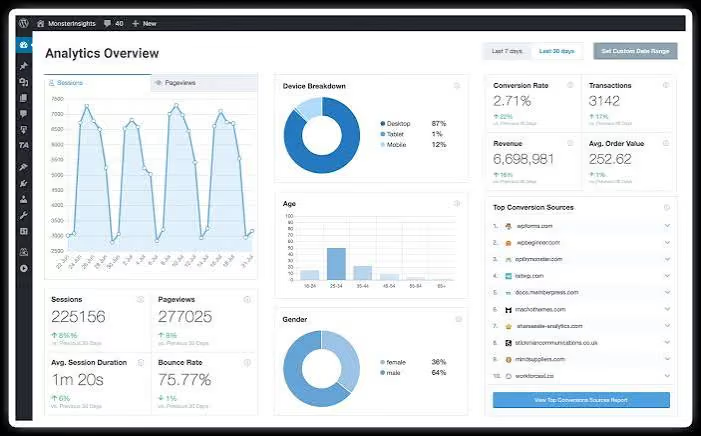
MonsterInsights is a WordPress plugin that pulls Google Analytics 4 data into your admin screen. WPBeginner's 2026 roundup names it the top pick for bringing GA4 into WordPress, with ecommerce reporting on revenue, transactions, conversion rate, average order value, popular products and top conversion sources.
A 2026 plugin comparison from Glad Made adds that it can automatically track product views, add-to-cart, checkout and purchase events, and lists a free version alongside paid tiers starting at $99.60 per year. The same guide points out that the product depends on GA4, so your results follow how well GA4 is configured.
That dependency matters for small teams. GA4 is a general-purpose analytics system with its own learning curve, and it was not built around store revenue. If you want to see how newer traffic sources show up there, this walkthrough on how to track LLM traffic in GA4 shows the setup involved.
Best for: teams already committed to GA4 who want its reports in the WordPress dashboard.
Metorik
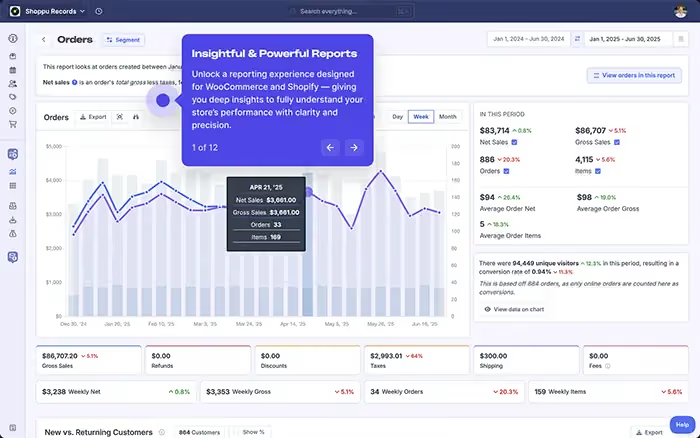
Metorik is an external reporting app that connects to your store. WPBeginner describes it as suited to larger stores because it processes data on its own servers, offers real-time metrics and advanced segmentation, and has no free plan. Heavy reports therefore do not slow the WordPress admin area.
Glad Made's guide lists customer segmentation, cohort analysis, product insights, subscription metrics, abandoned-cart recovery and a real-time orders and revenue dashboard. That is deep order-and-customer reporting. It reads WooCommerce and Shopify data, so it centers on what happened inside the store rather than on the search and campaign activity that preceded it.
Best for: high-volume stores whose main need is customer segmentation and order-level reports.

A note on store search analytics
Some plugins report on what shoppers type into your store's search bar. FiboSearch, for example, includes analytics for store search phrases, listing total searches, searches that returned results and trending phrases, with data kept for 30 days. This is useful product-demand information, and it complements rather than replaces revenue attribution from your traffic sources.
How to choose
Work through these five questions in order.
1. Do you spend money or time on marketing?
If yes, you need attribution. Order reports cannot tell you whether the sale came from organic search, a paid ad or an email. Choose a tool that reports revenue by channel, page and keyword. That is what Cromojo's Revenue Analytics is built for.
2. How much setup can you maintain?
GA4-based plugins need GA4 configured correctly, including events and conversions. Cromojo's tracking is designed for minimal setup on any tech stack, so a store owner without an analyst can get to a useful dashboard faster.
3. Do you care about visitor privacy?
Cookieless, first-party tracking reduces the consent and cookie-banner overhead that comes with cookie-based analytics, and it fits stores that sell to privacy-conscious shoppers.
4. Does search visibility affect your sales?
If organic search is a revenue source, pages that are not indexed earn nothing. Cromojo is the option here that handles automated indexing and site monitoring alongside revenue reporting, so you can see a drop in indexed pages next to the revenue effect.
5. Are you managing more than one site?
Agencies need consistent reporting across clients. Cromojo prices by tracked sites and pageviews, and its Agency plan is made for that case.
Set up attribution so the numbers can be trusted
Whichever tool you use, attribution is only as good as the links you tag. Glad Made recommends adding UTM source, medium and campaign parameters to marketing links so campaigns can be tied to revenue, and warns that last-click attribution credits only the final touchpoint before a purchase.
A simple routine:
- Tag every email, social and paid link with UTM parameters, using the same naming scheme each time.
- Define your goals: purchase, add to cart, checkout start.
- Build one funnel from your top landing page to purchase and watch where it narrows.
- Review revenue by channel and by page weekly, not just traffic.
- Check that your revenue-earning pages are indexed and loading without errors.
In Cromojo, steps 2 to 5 sit in the same product: Goals, Funnels, revenue by channel, and the indexing and monitoring views. Email reports bring the key numbers to you instead of waiting for you to log in.
Our perspective
We built Cromojo because most analytics tools answer "how many visitors?" when a store owner needs to know "what did they buy, and what brought them?"
Traffic numbers feel reassuring, but they do not pay invoices. Revenue does. That is why our platform starts from revenue and attributes it to the keyword, page and channel behind it, with Stripe and Shopify connected directly.
We also think analytics should not require an analyst. Our agents watch your site continuously and surface the specific issues and opportunities that hold conversions back, so you spend time fixing things rather than hunting through charts. And because indexing and monitoring live in the same dashboard, the pages that earn money stay visible to search engines and online.
If you run a store, a marketing team or an agency, our aim is simple: fewer tools, clearer numbers, faster decisions.
See revenue by keyword with Cromojo
If you want one place for revenue attribution, conversion funnels, indexing and site monitoring, start with Cromojo's Free Plan or compare the Starter, Pro, Business and Agency tiers. Paid plans are billed monthly based on site usage, and they follow a free trial.
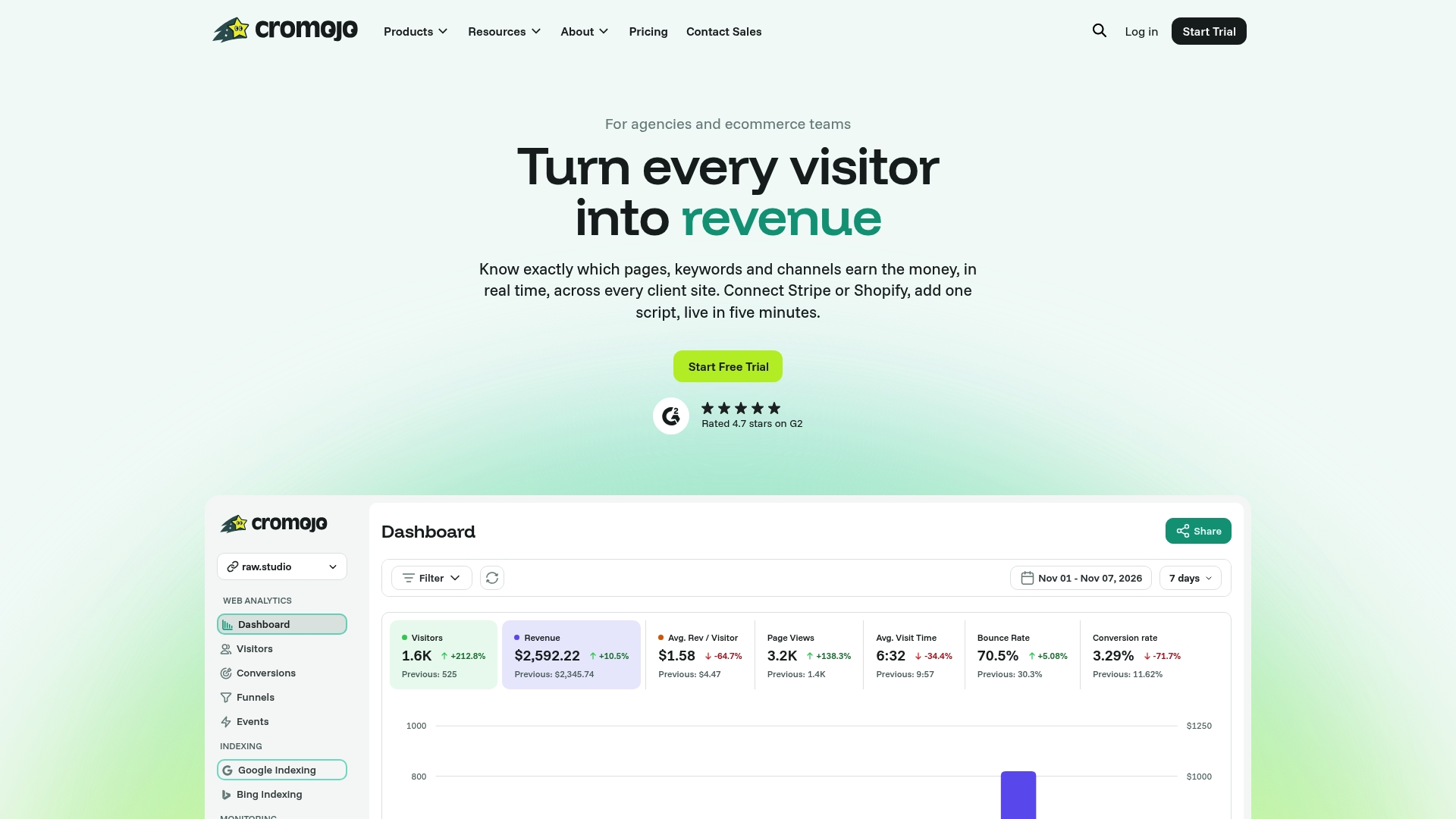
See the plans and pricing to choose the tier that matches your pageviews and number of sites. If conversion work is the bigger need, our Conversion Optimization Services start from $3,800 per month.
Sources
- 7 Best WooCommerce Reporting and Analytics Plugins for 2026 (WPBeginner)
- WooCommerce Analytics Plugins Compared (Glad Made)
- 7 WooCommerce Analytics Alternatives (WiserReview)
- Search analytics for your WooCommerce store (FiboSearch)
- WooCommerce Analytics & Reporting: Complete 2026 Guide (EasyWPKit)