
An ecommerce SEO audit identifies exactly which product and category pages are failing to rank, get crawled, or convert, so you can fix the right problems in the right order. The goal is not more pages in the index. It is making sure your revenue-driving pages are findable, indexable, and performing well enough to earn clicks and sales.
Run these six checks first. They expose the highest-impact problems in under four hours:
- Crawlability and indexation - confirm Google can reach your homepage, top category pages, and best-selling product pages without hitting blocks.
- Sitemap and robots.txt - verify your XML sitemap is submitted in Google Search Console and robots.txt is not accidentally blocking revenue pages.
- Canonical and parameter handling - check that faceted navigation and product variants are not creating thousands of duplicate URLs competing against each other.
- Core Web Vitals - run PageSpeed Insights on one category page and one product page; flag any LCP above 2.5 seconds.
- Product schema presence - use the Rich Results Test on a product page to confirm Product JSON-LD with price and availability is rendering correctly.
- Top product and category SERP performance - pull the Google Search Console Performance report and check impressions, clicks, and average position for your ten highest-revenue pages.
A DIY quick-check covering these six areas takes roughly 3 to 4 hours. A full technical crawl with log-file analysis, keyword mapping, and schema validation across a large catalog typically runs 1-3 days depending on site size. According to WebMedic's audit data across 80+ stores, stores that act on a thorough technical audit often see measurably more indexed pages and higher organic traffic within weeks, though results vary by catalog size and how quickly fixes are implemented.
Key Takeaways
A complete ecommerce SEO audit prioritizes index optimization for revenue pages first, then fixes speed and on-page issues, then validates schema and Merchant Center alignment, with all improvements tracked against revenue-connected KPIs.
What does a complete ecommerce SEO audit cover?
The scope of a full audit spans ten distinct areas: technical health, indexability, on-page content, product and category templates, structured data, site speed, crawl analysis, internal linking, keyword mapping, and backlink monitoring. Knowing the sequence matters as much as knowing the checklist.
JetOctopus recommends prioritizing audit work by revenue impact and splitting the work into layers: technical health and crawlability first, then performance and user satisfaction, then content and schema. That sequencing exists for a practical reason: fixing a canonical error on a category page costs nothing if that page is still blocked in robots.txt.
Recommended sequence:
- Quick triage (crawl errors, sitemap status, robots.txt, GSC coverage report)
- Deep crawl (full site crawl with Screaming Frog or Sitebulb, log-file analysis)
- Template fixes (canonical strategy, parameter handling, speed improvements)
- Content and schema layer (on-page copy, Product JSON-LD, Merchant Center feed)
- Prioritized sprint plan and ongoing monitoring
Who owns each phase: Your developer handles crawl fixes, redirect chains, and robots.txt. Your SEO lead owns keyword mapping, canonical strategy, and schema validation. Your product manager or merchandising team handles category page copy and product descriptions. Each phase should produce a concrete output: an issue tracker with severity ratings, a prioritized roadmap, and a QA task list for the dev team.
What the audit does not cover: a full content strategy rewrite, paid advertising analysis, or conversion rate optimization beyond what directly affects organic performance.
How to run the technical SEO checks for your store
Start with a full site crawl. Screaming Frog and Sitebulb both export the data you need: status codes, canonical tags, meta robots directives, and redirect chains. Export everything and filter by issue type before you start fixing anything.
XML sitemap hygiene. Your sitemap should contain only indexable, 200-status pages. Remove any URLs that return a redirect, carry a noindex tag, or point to paginated pages beyond page one. Confirm the sitemap is submitted and successfully read in Google Search Console under Sitemaps. The submitted count and the indexed count should be close. EcomSEO's practitioner findings identify sitemap errors as a primary cause of product pages being excluded from the index, particularly when faceted navigation generates thousands of parameterized URLs that end up in the sitemap by mistake.
robots.txt checks. Block low-value paths: internal search results (/search), cart pages, account pages, and common filter paths that generate duplicate content. Never block your category or product page templates. A quick test: paste your robots.txt into Google Search Console's robots.txt tester and check your top ten revenue URLs against it.
Status codes and redirect chains. Filter your crawl export for 404s, 5xx errors, and soft 404s. For redirect chains longer than two hops, collapse them to a single 301. A three-hop chain (old URL to intermediate URL to final URL) wastes crawl budget and dilutes link equity. Fix the chain at the server level so the original URL points directly to the destination.
Canonical strategy. Product variants (size, color, material) should canonicalize to the primary product page unless each variant has meaningfully distinct content and search demand. Never set a canonical pointing to a non-200 page, and never create canonical chains where page A canonicalizes to page B which canonicalizes to page C.
Parameter handling. Faceted navigation is the most common source of URL explosion on ecommerce sites. Your options: block filter parameters in robots.txt, apply self-referencing canonicals on filtered pages, or use Google Search Console's URL Parameters tool for legacy parameter signals. The cleanest approach for most stores is a canonical pointing filtered pages back to the base category URL, combined with blocking low-value parameter paths in robots.txt.
AuditMySite notes that Shopify stores frequently encounter duplicate product paths because products appear under both /products/ and /collections/[collection]/products/ URLs. Shopify handles this with a self-referencing canonical on the /products/ path, but third-party apps sometimes override that canonical. Check it manually with URL Inspection in Google Search Console on a representative product page.
Pro Tip: Use the URL Inspection tool in Google Search Console to live-fetch a representative product page template and a category page template. Check the rendered HTML for canonical tags, noindex directives, and whether the price and availability data appears in the page source rather than being injected by JavaScript after load.
Are your pages actually indexed in Google Search Console?
Open the Index Coverage report (now labeled "Pages" in the newer GSC interface) and sort by status. The four buckets to focus on:
- Valid - pages Google has indexed. Cross-reference this count against your intended indexable pages.
- Valid with warnings - often duplicate pages without canonical tags; worth investigating.
- Excluded - the most important bucket for ecommerce. Common reasons include "Alternate page with proper canonical tag" (expected for variants), "Crawled, currently not indexed" (thin content or low-quality signal), and "Discovered, currently not indexed" (crawl budget or internal linking problem).
- Error - 404s, server errors, and redirect errors that need immediate fixes.
A healthy store should have a submitted-to-indexed ratio above 70-80%. SEMTAK's guidance treats ratios below that threshold as a red flag requiring technical investigation. If you have 5,000 URLs in your sitemap and only 2,800 are indexed, you have a structural problem, not a content problem.
Use URL Inspection on individual product, category, and faceted URLs to see the last crawl date, the canonical Google selected, and whether the page is mobile-friendly. For pages stuck in "Discovered, currently not indexed," check internal linking depth. Pages that are more than four clicks from the homepage are often under-crawled.
Pro Tip: Sort the Google Search Console Performance report by impressions descending, then filter for pages with more than 500 impressions but a click-through rate below 2%. These pages are visible in search but failing to earn clicks. They are your highest-priority targets for title tag and meta description rewrites.
For a deeper look at why pages miss the index entirely, this breakdown of common indexation blockers covers the most frequent root causes and how to fix them.
How to audit product and category pages at scale
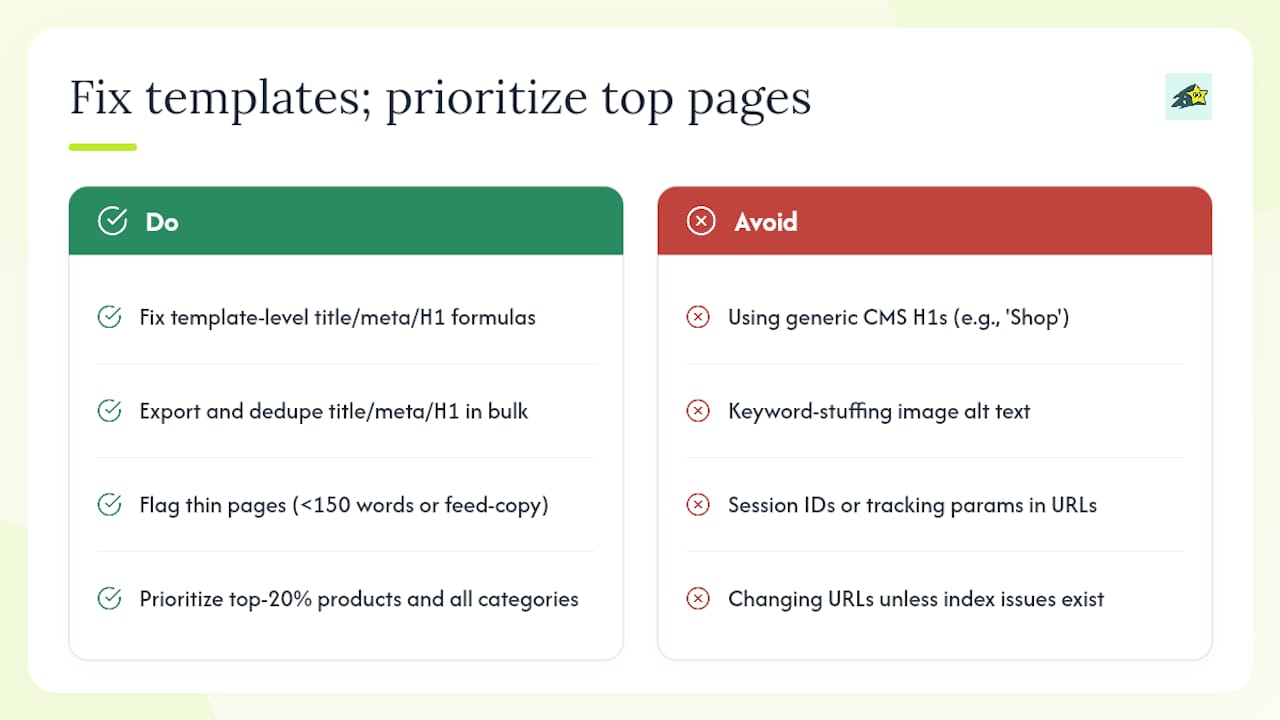
On-page issues on ecommerce sites are almost always template problems, not individual page problems. If your title tag formula is wrong, it is wrong on every product page. Fix the template and you fix thousands of pages at once.
Export and audit title tags, meta descriptions, and H1s. Screaming Frog exports these in bulk. Filter for duplicates first. A common pattern: every product page has the title "Product Name | Brand" with no category context, no keyword variation, and no differentiation between similar products. Category pages often inherit a generic H1 from the CMS template ("Shop" or the store name) rather than a descriptive heading.
Image optimization. Product images are frequently the single largest contributor to slow LCP. Every image should have explicit width and height attributes set in HTML to prevent layout shift, a descriptive alt attribute (not keyword-stuffed, just accurate), and compression applied before upload. Use srcset for responsive images so mobile devices load smaller files.
Thin content detection. A product page with only a product title, price, and three-sentence manufacturer description is thin by most practical standards. The test is not word count; it is whether the page gives a searcher a reason to stay and buy. Template patterns that flag thin pages automatically: pages with fewer than 150 words of unique body copy, pages where the description matches the manufacturer's feed verbatim, and pages with no reviews or specifications.
URL structure. Keep URLs short, descriptive, and free of session IDs, tracking parameters, or redundant category nesting. /products/blue-running-shoes is better than /shop/footwear/running/mens/blue-running-shoes-size-10-sku-12345. Avoid changing URLs on established pages unless the current structure is actively causing indexation problems.
Pro Tip: Prioritize your top 20% of revenue-generating products and all category pages for unique meta descriptions and enhanced schema first. These pages drive the most traffic and conversions. Fixing their templates delivers measurable results faster than auditing the long tail.
For context on why thin or low-quality product pages get excluded from the index, Google's EEAT signals and content quality standards are worth understanding before you write your remediation brief.
How do you map keywords to the right product and category pages?
Pull the Performance report from Google Search Console and export all queries with at least ten impressions over the past three months. Group queries by commercial intent: broad category terms ("running shoes," "women's sneakers") belong on category pages, while long-tail product queries ("Nike Air Zoom Pegasus 41 size 9 women's") belong on product pages.
The most common mapping problem is keyword cannibalization: two or more pages competing for the same query. This happens when a brand creates both a category page and a blog post targeting "best running shoes for flat feet," or when product variants each have their own indexable URL targeting the same keyword.
Start with pages that already earn impressions but rank in positions 8-20. These pages are close to page one and respond quickly to on-page improvements. Use a keyword tool like Ahrefs or a similar platform to validate search volume and identify gaps where you have no page targeting a commercially valuable query.
What is different about auditing PLPs versus PDPs?
Product listing pages (PLPs) and product detail pages (PDPs) have different SEO requirements and different failure modes. Treating them the same in an audit wastes time.
PLP checklist:
- H1 matches the category's primary keyword (not the store name or a generic label)
- Short descriptive intro paragraph (2-4 sentences) above the product grid for crawlable context
- Canonical tag pointing to the base paginated URL on page 1; paginated pages use
rel="next"andrel="prev"where supported or self-canonicalize - Faceted navigation controls either blocked in robots.txt or canonicalized to the base category
- Internal links to relevant subcategories and high-value filter combinations that have dedicated landing pages
- Product schema on any featured or promoted items within the listing
PDP checklist:
- Product JSON-LD with
offers,priceCurrency,availability, andnameproperties populated from live data - Unique product description with specifications, materials, or use-case details not duplicated from manufacturer copy
aggregateRatingschema only on pages where reviews actually exist in the HTML (never add it to pages with no reviews)- Image gallery optimized for speed: lazy-loaded images below the fold, hero image preloaded
- Add-to-cart button and price visible in server-rendered HTML, not injected by JavaScript after page load
Pro Tip: Before anything else on a PDP audit, confirm two things: (1) price and availability appear in the raw HTML source (not just after JavaScript executes), and (2) reviews schema is present only on pages where reviews are actually rendered. Both are common errors that trigger Google Search Console enhancement warnings.
Does your structured data meet Google's requirements?
Schema defines the required and recommended properties for every schema type. For ecommerce, the four types you need are Product, Offer, BreadcrumbList, and Organization. The Product type requires at minimum a name; Offer requires price, priceCurrency, and availability. Missing the Offer block entirely is the most common structured data error on ecommerce sites.
Validate your markup with two tools. The Rich Results Test shows whether a URL is eligible for rich results and flags specific property errors. Google Search Console's Enhancements reports show errors and warnings across all indexed pages at scale, which is where you catch template-level problems.
For Google Merchant Center, the critical checks are that the price on the feed matches the price on the page, and that availability status is accurate and updated within 24 hours of inventory changes, and that there are no policy disapprovals hiding inventory from Shopping results. A mismatch between your feed price and your page-level schema price is a common cause of Merchant Center disapprovals that silently remove products from Shopping.
Pro Tip: Add minimal Product JSON-LD to every revenue-driving SKU using an automated template. The template should pull price, availability, and product name dynamically from your product database so the schema stays in sync when prices change. Static JSON-LD that goes stale is worse than no schema, because it creates a mismatch that triggers Merchant Center warnings.
WebMedic's checklist confirms that accurate priceCurrency and availability in structured data materially improves the chance of rich results and higher CTR.
How do Core Web Vitals affect your store's revenue?
Core Web Vitals are Google's field-based performance metrics, and they affect both rankings and conversions. The three thresholds to hit: LCP (Largest Contentful Paint) below 2.5 seconds, INP (Interaction to Next Paint) below 200 milliseconds, and CLS (Cumulative Layout Shift) below 0.1.
Measure with PageSpeed Insights (which combines Lighthouse lab data with Chrome UX Report field data) and the Core Web Vitals report in Google Search Console. Field data reflects real user experience across devices and connection speeds; lab data is useful for diagnosing specific issues but does not represent your actual traffic.
Common ecommerce speed problems:
- Oversized product images served without compression or next-gen formats (WebP, AVIF)
- Too many third-party scripts: live chat, review widgets, affiliate trackers, and retargeting pixels all add to load time
- Render-blocking CSS and JavaScript that delays the first meaningful paint
- Slow time-to-first-byte (TTFB) on shared hosting, particularly under traffic spikes
Fixes by impact: Image optimization and lazy-loading deliver the largest LCP improvement for most stores. Critical CSS inlining removes render-blocking delays. Deferring non-essential scripts (chat widgets, analytics tags that are not critical path) reduces INP. For Shopify stores specifically, AuditMySite's findings show that theme and app script bloat is a leading cause of poor Core Web Vitals, and an app audit (removing unused apps that still inject scripts) often produces immediate gains.
Pro Tip: Run PageSpeed Insights on three representative templates: your homepage, one category page, and one product page. Fix LCP issues on the category and product templates first. Those pages drive revenue; the homepage drives brand recognition.
For a broader look at how site performance and uptime connect to search visibility, uptime monitoring as an SEO factor is worth adding to your monitoring stack.
What does crawl analysis reveal that GSC misses?
Google Search Console shows you what Google decided to index. Server log analysis shows you what Googlebot actually requested, how often, and which paths consumed the most crawl budget. The two datasets together reveal problems that neither source exposes alone.
From your server logs, extract Googlebot requests by path, status code, and frequency. Common findings: Googlebot spending 40% of its crawl budget on /search?q= URLs from your internal site search, or hitting paginated filter pages 200 times per day while your new product pages go weeks without a crawl.
Crawl traps to look for:
- Faceted navigation generating infinite URL combinations (
/shoes?color=blue&size=10&sort=price&page=3) - Internal search results indexed and linked from the site
- Session IDs or tracking parameters appended to URLs by JavaScript
Orphan pages are a related problem. These are pages that exist in your sitemap but have no internal links pointing to them. Googlebot finds them via the sitemap, crawls them once, and then rarely returns because there is no internal link signal reinforcing their importance. Cross-reference your sitemap URLs against your crawl export to find them.
Pro Tip: Sort your log data by Googlebot hits per day, descending. The top 20 paths by hit count are where your crawl budget is going. If any of those paths are low-value (search results, filters, cart), block or canonicalize them immediately. Every wasted crawl is a revenue page that did not get crawled instead.
How should your site architecture support revenue pages?
The core principle is simple: keep your highest-revenue pages within two to three clicks of the homepage. Every additional click of depth reduces the crawl frequency and the internal link equity those pages receive.

Audit your click depth with a site crawl. Screaming Frog's crawl depth report shows how many clicks separate each URL from the homepage. Product pages buried at depth five or six are almost always under-indexed and under-ranked compared to their commercial value.
Check four internal linking sources: main navigation, footer links, breadcrumbs, and related-products modules. Your main navigation should link directly to your top-level category pages. Breadcrumbs should follow a consistent Homepage > Category > Subcategory > Product pattern and be marked up with BreadcrumbList schema. Related-products modules on PDPs are one of the most underused internal linking tools in ecommerce; they pass equity between products and keep users on the site.
Faceted navigation requires a controlled approach. Do not link to every possible filter combination from your category pages. Instead, identify filter combinations with real search demand (for example, "waterproof trail shoes" or "wide-fit running shoes") and create dedicated landing pages for those combinations with unique copy, a proper canonical, and a spot in your sitemap. Link to these pages from the relevant category pages and from the navigation where appropriate.
Orphan pages discovered in the crawl analysis phase get fixed here: add them to the relevant category page's internal linking structure or to the sitemap with a supporting internal link from a related page.
How do you turn audit findings into a 90-day roadmap?
Score every issue on two axes: revenue impact (high/medium/low based on the traffic and conversion value of the affected pages) and engineering effort (hours or story points). Issues with high revenue impact and low effort go into Sprint 1. High impact, high effort issues go into Sprint 2 with proper resourcing. Low impact issues go into a backlog.
Sprint structure:
- Sprint 1 (weeks 1-3): Critical crawl and index fixes. robots.txt corrections, sitemap cleanup, redirect chain consolidation, canonical errors on top revenue pages. These are usually configuration changes, not development work.
- Sprint 2 (weeks 4-8): Speed and template fixes. Image optimization, script deferral, canonical template updates, parameter handling policy. Requires developer time.
- Sprint 3 (weeks 9-12): Content and schema enhancements. Product JSON-LD templates, Merchant Center feed alignment, category page copy improvements, keyword mapping updates.
KPIs to track from day one:
- Indexed pages ratio (submitted vs. indexed in GSC)
- Organic impressions and clicks for priority pages (GSC Performance report)
- Average position for target keywords on top PLPs and PDPs
- Core Web Vitals pass rate in GSC
- Revenue attributed to organic traffic (requires a revenue attribution tool)
Backlinko's ecommerce audit guidance reinforces that the goal is index optimization, not index expansion. Measure the ratio of intended indexable pages that are actually indexed, not the raw total.
For small catalogs (under 1,000 SKUs), one developer and one SEO can complete Sprints 1 and 2 in six weeks. Mid-size catalogs (1,000-10,000 SKUs) typically need a dedicated sprint team and eight to twelve weeks. Large catalogs above 10,000 SKUs require phased rollouts by category.
Stakeholder handoffs: Dev team receives a prioritized issue tracker with reproduction steps and expected outcomes. SEO lead owns the keyword mapping document and schema templates. Product manager approves copy changes and category page structure updates.
How to run a DIY audit using only free Google tools
You do not need a paid crawler to find the most critical issues on your store. A Google-only DIY audit surfaces the majority of high-impact problems in a few hours and is a practical starting point before investing in deeper tooling.
11-step DIY audit (estimated time: 3-4 hours):
- GSC Coverage report (20 min) - check "Excluded" and "Error" buckets; record the top three exclusion reasons.
- Sitemap submission status (10 min) - confirm last read date and submitted vs. indexed count in GSC Sitemaps.
- robots.txt review (15 min) - fetch
yourdomain.com/robots.txtin a browser; check for accidental blocks on/productsor/collections. - URL Inspection on five key pages (30 min) - test your homepage, two category pages, and two product pages; record canonical, index status, and last crawl date.
- Performance report export (20 min) - filter last 90 days; sort by impressions; identify top ten pages and their average positions.
- High-impression, low-CTR filter (15 min) - filter for pages with over 200 impressions and CTR below 2%; these are your title/meta priority list.
- PageSpeed Insights on three templates (20 min) - homepage, one PLP, one PDP; record LCP, INP, and CLS scores.
- Rich Results Test on one PDP (10 min) - confirm Product schema renders with price and availability.
- Manual robots.txt tester in GSC (10 min) - test your five key URLs against your robots.txt.
- Internal search check (10 min) - search
site:yourdomain.com inurl:searchin Google; if results appear, your search pages are indexed. - 404 check (15 min) - GSC Coverage report "Not found (404)" list; export and cross-reference against your top-linked pages.
Pro Tip: After step 6, take the high-impression, low-CTR pages directly into a title tag rewrite session. Use the query data from the Performance report to understand what searchers expect, then rewrite the title to match that intent more precisely. This is the fastest win in a free audit.
Hand the output of this audit to your developer as a QA list: robots.txt corrections needed, canonical mismatches found, pages to submit for reindexing, and speed issues to investigate. For guidance on speeding up the reindexing of fixed pages, Cromojo's indexing workflow guide covers the submission process in detail.
How do reviews and Q&A affect your store's SEO?
User-generated content (UGC) is one of the most underused SEO assets on ecommerce sites. Product reviews add unique, keyword-rich copy to PDPs without any editorial effort. A product page with 40 genuine reviews has substantially more crawlable text than one with only a manufacturer description, and that text tends to include the natural-language phrases real shoppers use when searching.
The audit question is not just "do we have reviews?" It is whether reviews are rendering in server-side HTML where crawlers can read them. Reviews loaded entirely via JavaScript after page load are invisible to Googlebot unless the page is fully rendered. Check the raw HTML source of a product page with reviews: if the review text does not appear in the source, it is not contributing to your SEO.
Q&A sections follow the same logic. If your platform supports a Q&A module, confirm the questions and answers appear in crawlable HTML and consider marking them up with FAQPage schema where the content is genuinely FAQ-style. This can earn rich results in search and increases the content density of your PDPs without requiring editorial resources.
One audit check worth running: compare the GSC Performance report impressions for PDPs with reviews against PDPs without reviews in the same category. The gap is usually visible and makes the case for a review acquisition campaign more clearly than any benchmark.
Does your site search create SEO problems?
Internal site search is one of the most common sources of index bloat on ecommerce sites. When a shopper searches for "blue running shoes" on your store, the resulting URL (/search?q=blue+running+shoes) is a unique, crawlable page. If Googlebot follows internal links to those URLs or finds them in your sitemap, it will crawl and potentially index thousands of search result pages that have no standalone search value.
The fix is straightforward: block /search (or your platform's equivalent search path) in robots.txt. Confirm the block is in place, then check GSC's Coverage report for any search result URLs that are already indexed. Submit a removal request for indexed search pages via GSC's URL Removal tool, then monitor the Coverage report over the following weeks to confirm they drop out.
Beyond the indexation problem, your site search data is a useful keyword research source. Export your internal search queries from your analytics platform. Queries with high volume and no dedicated landing page are product gaps or category page opportunities. Queries that return zero results are either inventory gaps or navigation failures worth fixing.
How do you audit your backlink profile for ecommerce?
Backlinks remain a significant ranking factor, and ecommerce sites face specific backlink challenges: product pages rarely attract natural links, category pages are often overlooked by link-building campaigns, and expired product pages that once had links now return 404s.
Start with a backlink audit in Ahrefs or a similar tool. Export your referring domains and filter for lost links. Lost links on product pages that have since been discontinued are a common issue: the original URL earned a link from a review or press mention, the product was removed, and the URL now returns a 404. Redirect those URLs to the closest live equivalent (the category page or a replacement product) to recover the link equity.
Check your anchor text distribution. A healthy ecommerce backlink profile has a mix of branded anchors ("YourStore.com"), navigational anchors ("shop running shoes at YourStore"), and natural descriptive anchors. An over-optimized profile with too many exact-match commercial anchors ("buy cheap running shoes") can attract algorithmic scrutiny.
For ongoing monitoring, set up alerts in your backlink tool for new links to your domain and for lost links on your top-revenue pages. A sudden loss of links to a category page is worth investigating immediately, as it often correlates with a traffic drop that appears in GSC two to four weeks later.
How do you measure SEO improvements after the audit?
Tracking post-audit progress requires a consistent set of KPIs measured at regular intervals. The metrics that matter most for ecommerce are not vanity metrics like total organic sessions; they are revenue-connected signals.
KPIs to track weekly in the first 90 days:
- Indexed pages ratio in GSC (submitted vs. indexed)
- Organic impressions and clicks for the pages you fixed (segment by page in the Performance report)
- Average position for target keywords on priority PLPs and PDPs
- Core Web Vitals pass rate (GSC Core Web Vitals report)
KPIs to track monthly:
- Revenue attributed to organic traffic by page and by keyword
- New referring domains to category pages
- Crawl error count in GSC (should trend down after Sprint 1 fixes)
The most important measurement is revenue attribution by page. Knowing that a category page fix drove a 15% increase in organic revenue is a far stronger signal than knowing impressions went up. Cromojo's revenue attribution by page and keyword connects GSC data to actual transaction revenue, so you can see which audit fixes moved the needle on sales, not just traffic.
Set a 90-day review checkpoint. By that point, Sprint 1 and Sprint 2 fixes should be reflected in GSC data. Index coverage improvements typically appear within two to four weeks of fixing crawl and sitemap issues. Ranking improvements from on-page changes usually take four to eight weeks. Revenue impact from ranking improvements follows with a further lag of two to four weeks as new traffic converts.
The audit mistake most store owners make
The single most common error in an ecommerce SEO audit is treating "more pages indexed" as the success metric. It is not. Index optimization is the goal, and those two things are not the same.
A store with 50,000 product pages in the index, half of which are out-of-stock variants with no unique content, is not winning at SEO. It is wasting crawl budget on pages that will never rank and never convert. The pages that matter are the ones with search demand, unique content, and a clear path to a transaction.
The second most common mistake is leaving faceted navigation URLs indexable. Filters for color, size, price range, and sort order generate URL combinations that multiply your page count without multiplying your value. EcomSEO's practitioner data consistently identifies faceted navigation and canonical errors as the primary causes of indexation loss on ecommerce sites. Fix the parameter handling policy before you spend time on anything else.
A third mistake: failing to monitor regressions after theme updates or app installations. A Shopify theme update can silently override your canonical tags. A new app can inject scripts that double your page load time. Neither shows up immediately in rankings; both show up in GSC data two to four weeks later if you are watching. Monthly monitoring of your critical templates is not optional. It is the difference between catching a regression in week two and discovering it in month four when the traffic drop is already visible.
Three corrective rules worth applying from day one: measure index coverage by intended indexable pages, not total indexed pages. Run a monthly crawl of your critical templates to catch regressions. Lock down parameterized URLs in robots.txt before you launch any new faceted navigation feature.
Cromojo connects audit fixes to real revenue
Running an audit tells you what to fix. Knowing whether those fixes actually moved revenue is a different problem, and it is where most teams lose the thread.
Cromojo gives ecommerce teams and agencies a direct line between SEO work and sales outcomes. The platform attributes real-time revenue to specific pages, keywords, and channels, so when you fix a category page canonical and its organic traffic climbs, you see the revenue impact in the same dashboard, not just the impressions.
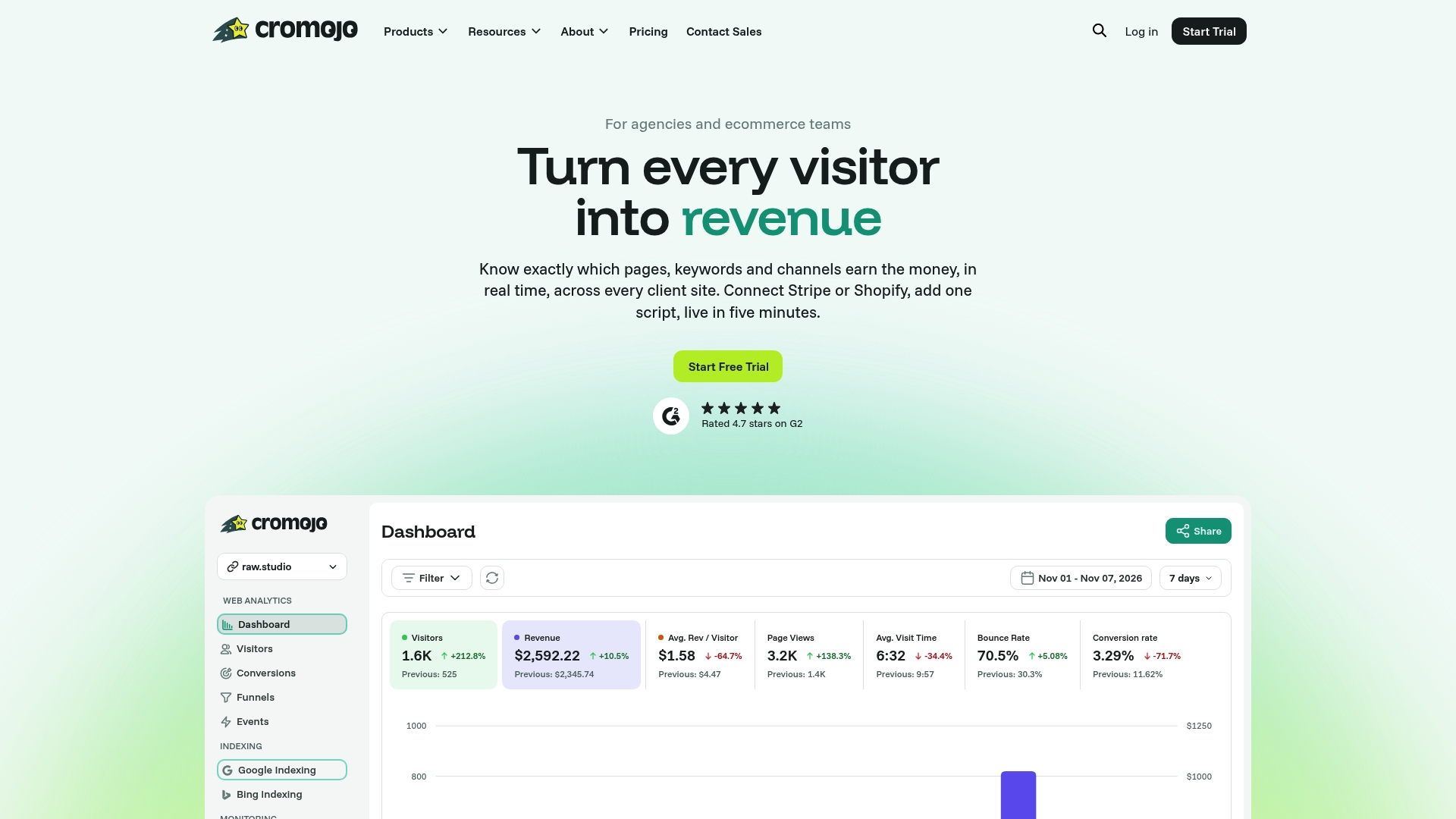
Beyond revenue attribution, Cromojo handles automated indexing submissions to Google, Bing, Yandex, and Baidu, so fixed pages get reindexed faster. The website monitoring feature alerts you when a page returns an error or goes offline, catching the kind of regressions that quietly undo audit work. It integrates with Shopify and Stripe, requires no cookies, and runs on a lightweight script that takes minutes to install.
Start a free trial at Cromojo and connect your store to see which pages are driving revenue and which are leaking it.