

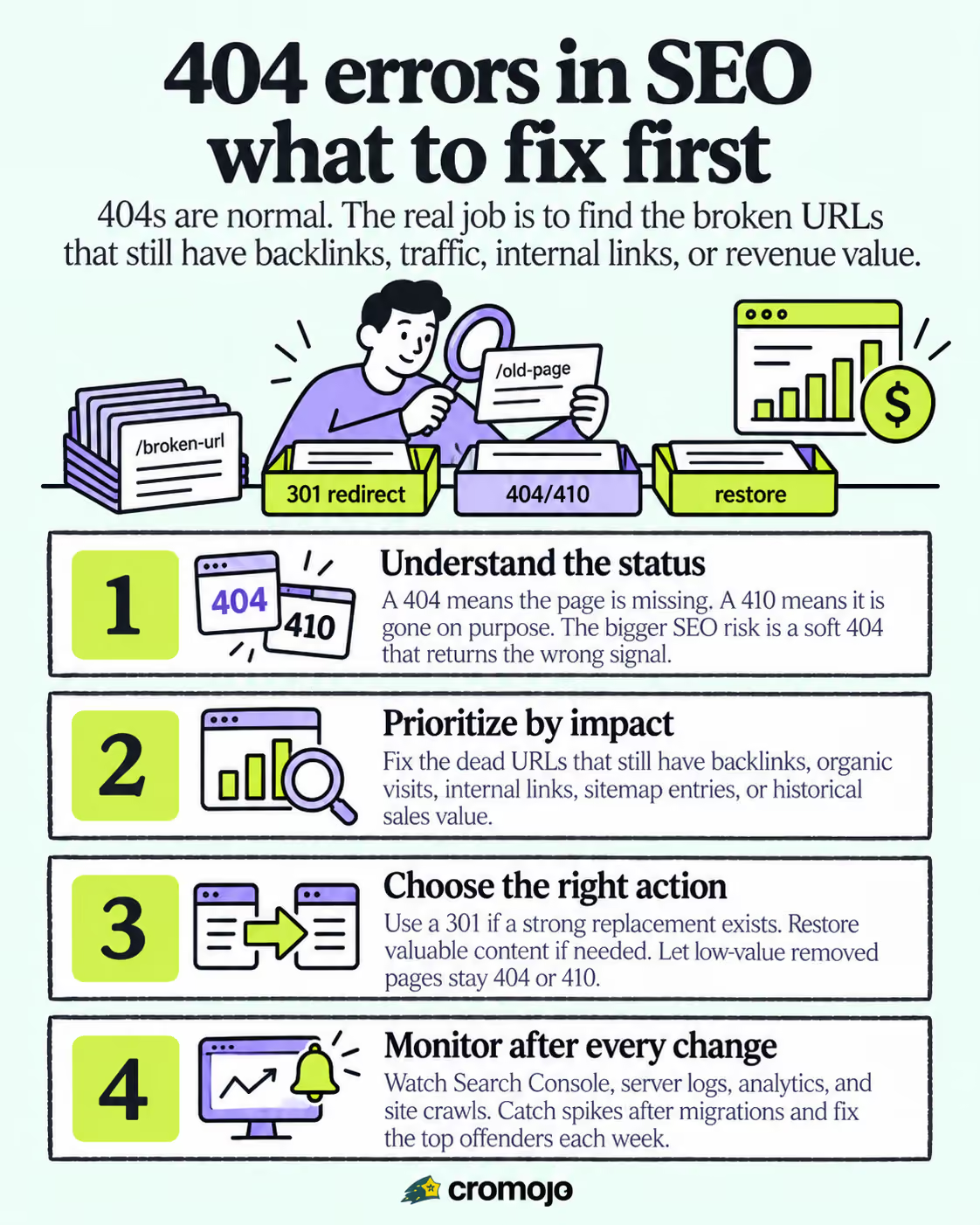
A 404 error is not a ranking penalty. Google treats it as a normal part of a healthy web, and Google's own Search Console guidance confirms that a 404 by itself won't hurt your site's search performance. The real risk is narrower: a missing page that still has backlinks, traffic, or internal links pointing to it can quietly bleed value. Your job is triage, not panic. Fix the URLs that matter, and let the rest return a clean 404 or 410.
What Is a 404 Error in SEO, and How Is It Different From a 410?
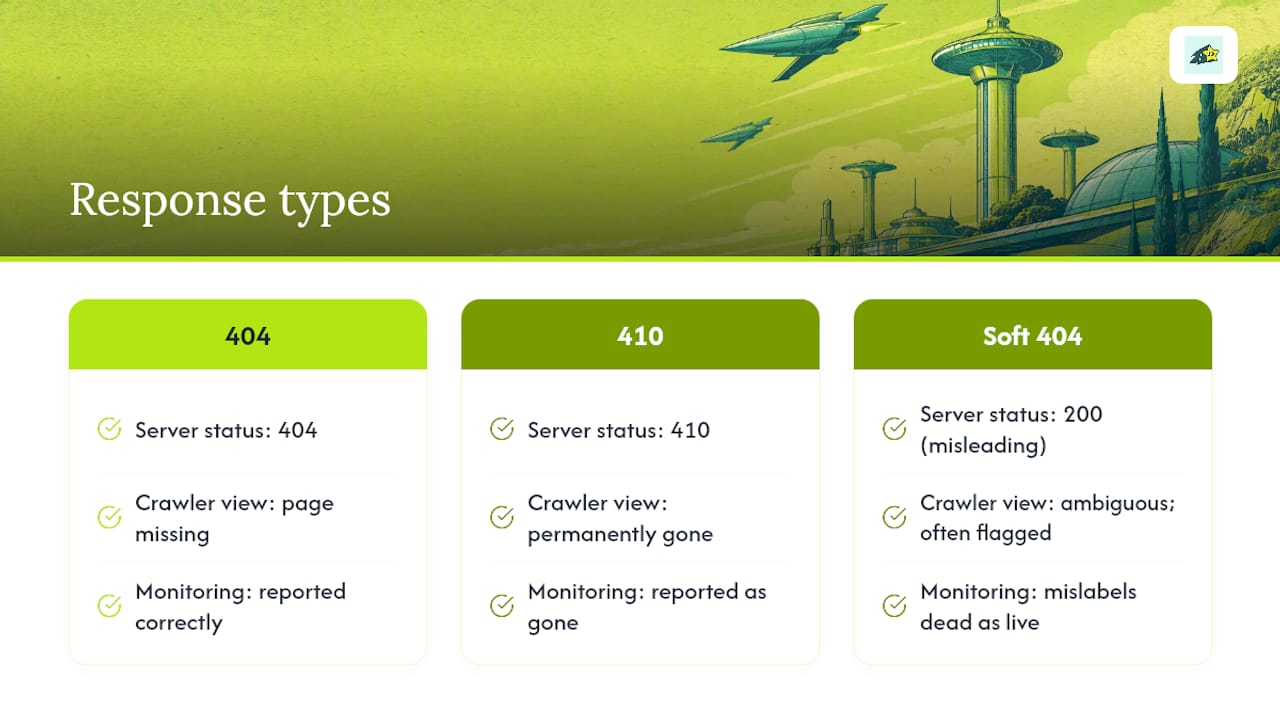
A 404 status code tells a browser or crawler "this page does not exist here." A 410 goes a step further. It says the page existed once but is permanently gone, on purpose. Both are honest signals, and neither damages your rankings on their own.
The status code that actually causes trouble is the soft 404. This happens when a server returns a 200 "OK" status, meaning the page loaded fine, but the content shown is a "not found," an empty template, or a generic error message disguised as a real page. Googlebot has to guess whether that page is legitimate, and it often flags it as a soft 404 anyway, just with extra confusion baked in.
Getting the status code right matters more than most site owners realize. Accurate codes let Search Console report your errors correctly, let crawlers decide how often to revisit a URL, and let your own monitoring tools tell the difference between "gone" and "broken." A site that mislabels its dead pages as live ones is working with bad data every time it tries to fix something.
What Usually Causes 404 Errors on a Website?
Most 404s trace back to a handful of repeat offenders. A typo in a link, a page that got moved or renamed without a redirect, a permalink structure change, or a broken rewrite rule after a migration will each generate a wave of dead URLs almost overnight.
Before you assume a page is truly gone, run a few quick checks. Server-side caching and CDN layers are notorious for serving stale 404 pages even after content is restored, and a hard refresh often resolves the issue instantly.
- Clear your CDN and browser cache, then reload with a hard refresh.
- On WordPress, resave your permalink settings. This regenerates rewrite rules and quietly fixes a large share of site-wide 404 waves.
- Check your
.htaccessfile or server config for a rule that got dropped during a migration. - Confirm
robots.txtisn't accidentally blocking a path that looks broken but is actually just hidden.
If none of those explain the error, you're likely looking at a genuinely deleted or renamed page, and it's time to decide what happens next.
Do 404 Errors Hurt SEO? What Google Actually Says
Google's position hasn't changed in years, and it's more forgiving than most site owners expect. John Mueller and other Google representatives have repeatedly said 404s are a normal part of the web and don't act as a negative ranking signal. A handful of 404s, or even a few hundred on a large site, isn't something Google penalizes you for. Pages disappear constantly across the entire internet, and Pew Research's analysis of link rot shows just how routine that churn really is.
The actual cost isn't a domain-wide penalty. It's narrower and more specific: a single URL loses whatever traffic and backlink equity it had earned, and that value doesn't automatically transfer anywhere else. If ten sites link to a page that now 404s, you've lost the ranking benefit of every one of those links, not because Google punished you, but because the destination they pointed to no longer exists.
That's the distinction that should guide your response. Act when a URL is in your sitemap, has inbound backlinks, still receives organic traffic, or is linked from other working pages on your own site. Skip the effort on dead URLs nobody links to and nobody visits. Search Engine Journal's coverage of Google's guidance makes the same point: the 404 itself isn't the mistake. Mishandling it, especially through soft 404s or blanket redirects, is where sites actually lose ground.
How to Find and Prioritize 404 Errors Before They Cost You Traffic
Finding your 404s is the easy part. Knowing which ones deserve your afternoon is where most teams get stuck.
Start with Google Search Console's Indexing report, under Pages, filtered to "Not found." That gives you Google's own list of URLs it has tried and failed to crawl. Cross-reference that against your server access logs, which show every 404 request your server actually served, including ones Google hasn't gotten to yet. A backlink tool rounds out the picture by telling you which of those dead URLs still have external links pointing at them, and a periodic site crawl catches ones your internal navigation is quietly linking to.
Once you have the list, prioritize in this order:
- URLs with backlinks. These are the highest-value fixes because you're recovering link equity you already earned.
- URLs with historical or current traffic. Check analytics for organic sessions on the dead path before it broke.
- URLs referenced in your sitemap or by internal links. These signal Google should still be finding the page, and a working internal link pointing nowhere wastes crawl attention.
- Everything else. Old low-value URLs with no links and no traffic can usually be left to 404 or converted to a clean 410.
Build this into a routine rather than a one-time cleanup. Export your Search Console report weekly, cross-reference it against backlinks and analytics, and fix the top five offenders each week rather than trying to clear the whole backlog at once. Seotest recommends exactly this kind of ongoing cross-reference rather than a single audit.
Pro Tip: Set an alert for sudden spikes in "Not found" reports right after any deployment or migration. A jump from a handful of 404s to a few hundred overnight almost always points to a broken rewrite rule or a bad redirect map, not a slow accumulation of dead links.
How to Fix a 404 Error: The Right Action for Each Scenario
Not every 404 gets the same treatment, and picking the wrong fix wastes effort or, worse, creates a new problem. Work through this decision order:
- The page had traffic or backlinks, and equivalent content exists. Set up a 301 redirect to the closest matching live page. A 301 tells both browsers and crawlers the move is permanent, and it passes along the ranking signals the old URL had built.
- The page had value but no true replacement exists. Restore the content instead of redirecting it somewhere unrelated. A redirect to a page that doesn't actually answer the same question frustrates visitors and signals a poor match to Google.
- The 404 came from a typo or a broken internal link. Fix the link at the source. This is the simplest category and the easiest to miss, since the "problem" isn't the destination at all.
- The page was deliberately removed with nothing to replace it. Let it return a 404, or switch to a 410 if you know the removal is permanent. Don't force a redirect just to avoid an error code.
When you do implement redirects, get the mechanics right. Use a 301, not a 302, for anything permanent, since a 302 tells crawlers the move might be temporary and can delay how link equity transfers. Avoid the common shortcut of redirecting every dead URL straight to your homepage. It looks tidy, but Google increasingly treats it as a soft 404 pattern, and visitors land somewhere that doesn't answer what they were looking for. Watch for redirect chains, where URL A points to B, which points to C, since each extra hop adds crawl overhead and can dilute the signal being passed.
Verify every fix before moving on. Test the live HTTP status with a command like curl -I or an online status checker, confirm the redirect resolves in a single step rather than chaining, and for your highest-priority pages, request reindexing directly through Search Console's URL Inspection tool so Google revisits the corrected URL sooner rather than waiting for its next natural crawl.
What Makes a Good 404 Page (and What Ruins One)
A 404 page has one job beyond returning the right status code: keep a visitor from leaving. Getting the status code right is non-negotiable. Never dress up a missing page as a 200 with "sorry, not found" text, since that's the exact soft 404 pattern Google's guidance calls out as harmful.
Beyond the technical layer, good 404 pages share a few habits:
- A search box, so visitors can find what they were actually looking for without starting over.
- Links to your top categories or most popular pages, not just a single "go home" button.
- Your normal header, footer, and navigation intact, so the visitor doesn't feel like they've left your site entirely.
- A short, clear message. "This page doesn't exist" beats a cute apology paragraph that delays the useful links below it.
Resist the urge to redirect every broken URL straight to your homepage instead of showing a proper 404 page. It might feel like better UX on the surface, but it erases the context of what the visitor was originally trying to reach, and at scale it starts to resemble the soft 404 pattern that confuses crawlers.
Pro Tip: Keep your 404 page's design in your normal template system, not a static HTML file bolted on separately. Static error pages tend to drift out of sync with site-wide navigation changes, and nobody notices until a visitor complains.
Soft 404s, Redirect Chains, and Other Crawl Budget Traps
A soft 404 wastes crawl budget in a specific way: Google requests a URL, gets a 200, and has to actually parse the content to figure out it's a dead end. Multiply that across thousands of thin or empty pages, and you've handed the crawler a lot of wasted work, work it could have spent discovering pages you actually want indexed.
Redirect chains create a similar drag, and the mass redirect-to-homepage pattern makes it worse by teaching Google that a huge share of your URLs lead to the same generic destination. Keep dead URLs out of your sitemap entirely. A sitemap listing pages that 404 sends a mixed signal about what's actually live on your site.
This is also where the 410 status earns its keep. A 404 leaves the door open, and Google may recrawl the URL periodically to check if it's back. A 410 closes that door explicitly, which can reduce recrawl attempts on pages you know are gone for good.
The Minimum Monitoring Stack for Catching 404s Early
You don't need a large toolkit here, just the right four pieces working together. Search Console gives you Google's own view of what it couldn't find. Server access logs show every request that actually hit your server, including bot traffic Search Console hasn't reported yet. Analytics tells you whether a broken URL is actually costing you visitors right now. A periodic crawl with a tool like Screaming Frog catches internal links pointing at dead pages before a human ever notices.
Layer monitoring on top of discovery rather than treating this as a one-time audit:
- Set an automated alert for any spike in Search Console's "Not found" report, since spikes almost always trace back to a specific deployment.
- Check referrer data on spiking 404s to find exactly which page or external site is sending broken traffic.
- After every fix, rerun the same checklist: confirm the HTTP status resolved correctly, confirm the redirect chain is one hop, and request reindexing for pages that matter most.
Treating monitoring as ongoing rather than occasional is what keeps a fixed problem from quietly reappearing after your next migration.
How Long Does It Take for SEO to Recover After Fixing a 404?
Verification and recovery happen on different clocks. Requesting reindexing through Search Console confirms Google can see your fix within days, but organic rankings catching back up to where they were can take anywhere from days to several weeks. Crawl frequency, how well the redirect passes link equity, and your site's overall authority all affect the pace. A high-authority page with strong internal links tends to recover faster than a thin page on a smaller site. Track organic traffic, keyword position, and referral paths from the original backlinks for a few weeks after the fix rather than expecting an overnight jump.
Do Google, Bing, and Other Search Engines Treat 404s the Same Way?
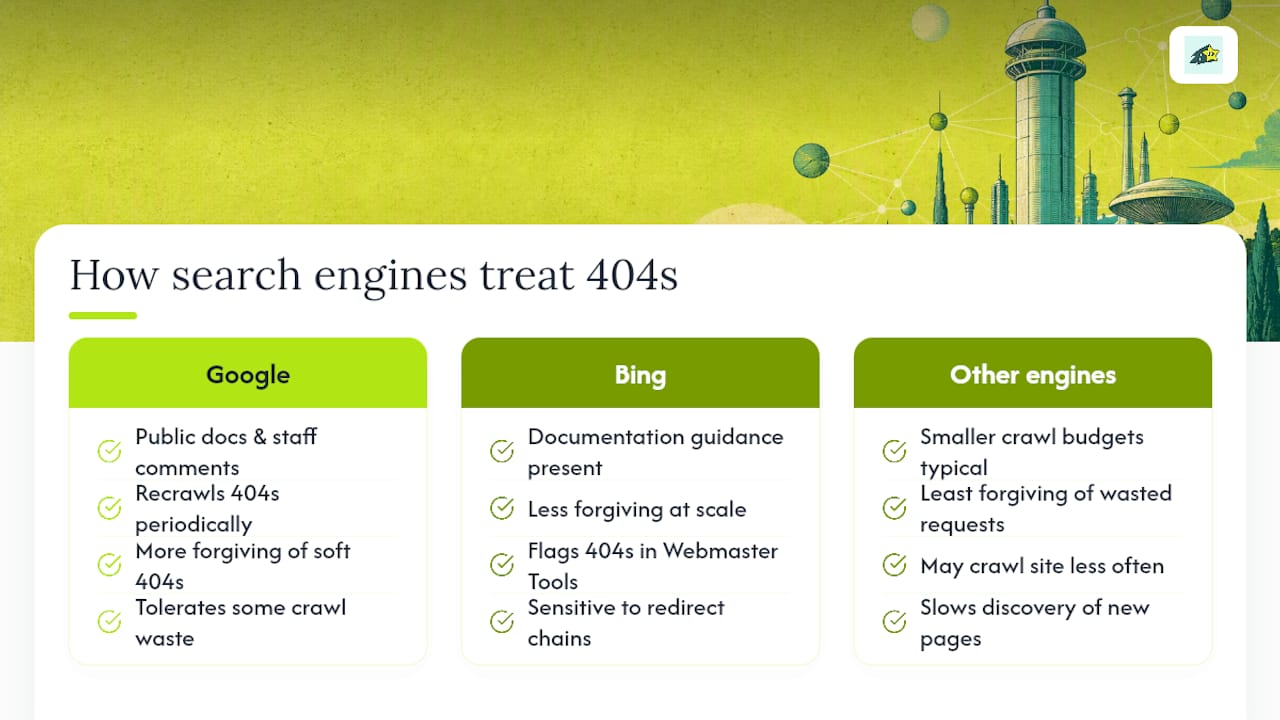
Google's approach is the most publicly documented, largely because John Mueller and other Google staff address the topic directly and often. Google's crawlers will periodically recheck a 404 URL for a while, partly because a page that once had value might return, and a recrawl is how Google finds out. That's not a red flag. It's closer to Google keeping a door open just in case.
Bing operates on similar principles but tends to be less forgiving of crawl waste at scale. Bing Webmaster Tools flags 404s in its own crawl reports, and Bing's documentation has historically emphasized clean site architecture and fast redirect resolution more heavily than Google's public statements do. In practice, this means a redirect chain or a soft 404 pattern that Google shrugs off may draw more attention in Bing's crawl stats.
Search engines with smaller crawl budgets for your site, which includes most engines besides Google and Bing, tend to be less forgiving of wasted requests overall. If your site sends a crawler to hundreds of soft 404s or redirect chains, an engine with a tighter crawl allowance may simply crawl less of your site rather than working through the mess, which can slow how quickly new or updated pages get discovered.
The practical takeaway is consistent across engines even where the details differ: accurate status codes, minimal redirect hops, and clean sitemaps serve every crawler well. None of them reward guesswork, and none of them are fooled for long by a soft 404 dressed up as a real page.
How 404 Errors Affect User Experience and Engagement
A visitor who lands on a broken link is one click away from leaving entirely, and a bare, unhelpful 404 page gives them every reason to. That shows up in your analytics as a spike in bounce rate and a drop in average session duration on whatever page or campaign is driving that broken traffic.
The damage compounds when the 404 comes from a paid ad, an email campaign, or a high-traffic backlink. Traffic you paid to acquire, or traffic a third-party site is generously sending you for free, lands on a dead end and evaporates. That's a direct hit to conversion rate and, for ecommerce sites in particular, a direct hit to revenue that never shows up as a "ranking" problem in any SEO report.
A well-designed 404 page recovers some of that loss. Search functionality and links to top categories give a confused visitor a second chance to find what they wanted, instead of forcing them to hit the back button or leave the site. Session-level engagement metrics, including pages per session and time on site, tend to hold up better on sites where broken links funnel visitors toward useful alternatives rather than a dead stop.
None of this shows up in Google's ranking algorithm directly. It shows up in your own conversion funnel, your bounce rate, and eventually your revenue reporting, which is exactly why treating a 404 as purely a "technical SEO issue" undersells what's actually at stake.
Good vs. Bad 404 Page Design: What Actually Works
A strong 404 page looks like the rest of the site, not a separate, forgotten corner of it. Full navigation stays intact, a search box sits near the top, and a short list of popular or recently updated pages gives the visitor an obvious next step. The tone matches the brand voice used everywhere else on the site rather than switching into a generic system error message.
A weak 404 page tends to share the same handful of mistakes. It's a bare white screen with a default server message and nothing else, or it strips out the site's header and footer entirely, making the visitor wonder if they've left the domain altogether. Some sites overcorrect in the other direction and auto-redirect every broken URL to the homepage, which erases the context of what the visitor was actually trying to find, and, as covered earlier, risks reading as a soft 404 pattern to crawlers.
The difference between the two isn't decoration. It's whether a confused visitor has a real path forward or has to start their search from scratch. Ecommerce sites in particular benefit from featuring a search bar and top-selling categories prominently, since a customer who hits a dead product page is often still in a buying mindset. Give them a way to keep browsing instead of losing the sale.
Why We Prioritize 404 Fixes by Revenue Impact, Not Just Traffic
Most 404 advice stops at "check your backlinks and traffic, then fix the biggest ones." That's a reasonable starting point, but it treats every visit the same, and for ecommerce sites, that's the wrong lens. A page with modest traffic but a high conversion rate can matter more than a high-traffic blog post that never generates a sale.
Some analytics platforms tie page-level activity back to actual revenue, not just pageviews, so a 404 on a product page that historically drove real purchases surfaces as a priority even if its raw traffic number looks unremarkable next to a popular article. Pairing that revenue view with automated indexing, ongoing site monitoring, and routine SEO health checks means a broken high-value URL gets flagged before it quietly costs a month of sales, rather than showing up three audits later.
This doesn't replace the standard backlink-and-traffic triage covered earlier. It adds a layer on top, specifically useful for teams whose real goal isn't clean crawl stats but actual revenue recovery. Technical SEO hygiene matters, but for a commerce site, the question worth asking first is: which of these broken pages used to make us money?
Fix What Costs You Sales, Not Just What Looks Broken
Chasing every 404 on a site is a good way to burn a week on pages nobody ever bought from. Cromojo's revenue attribution ties broken or underperforming pages directly to the sales they generated before they went dark, so you can fix the product page that quietly drove real revenue before you spend time on the orphaned blog post that never converted anyone.
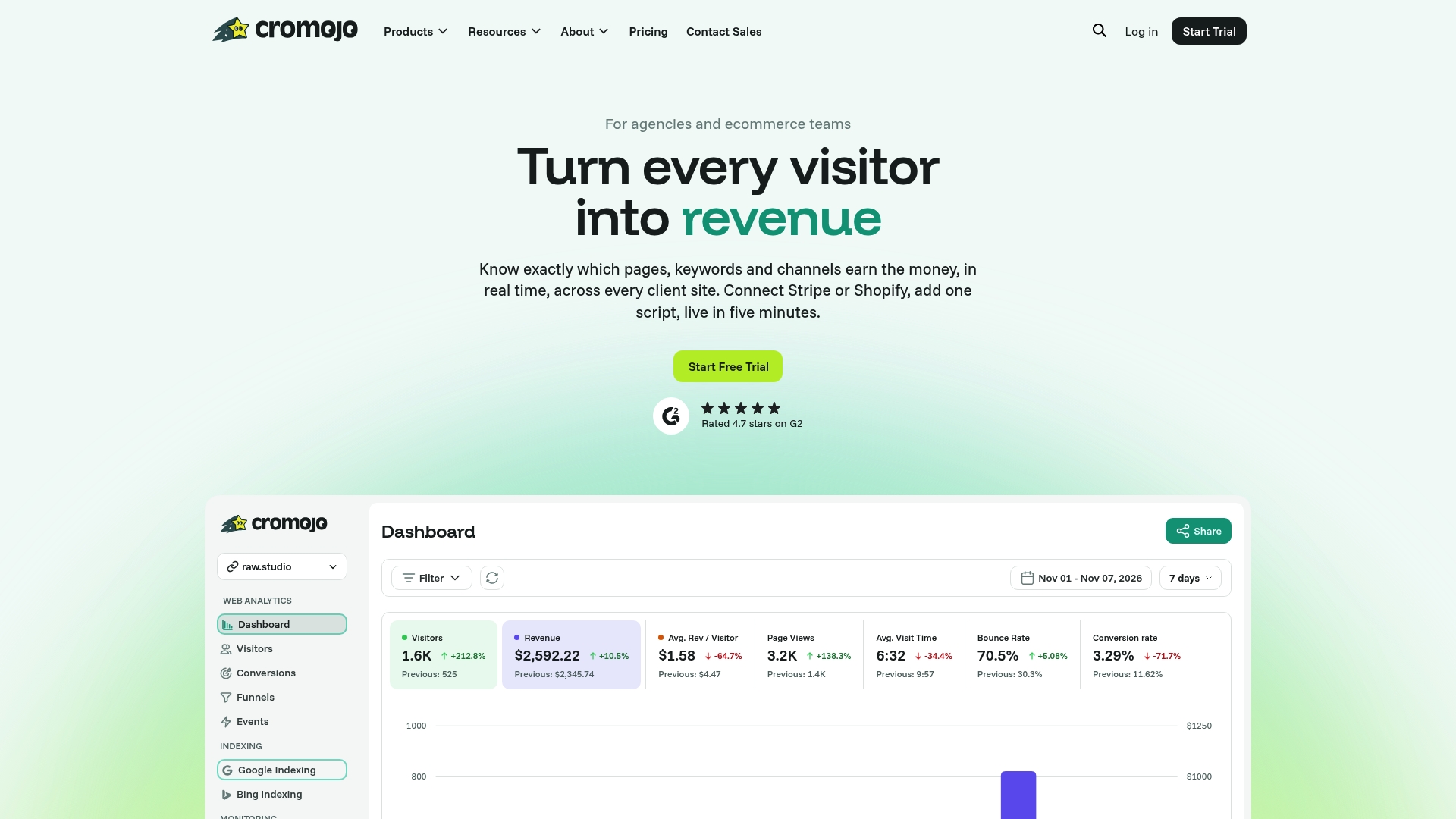
Beyond prioritization, some revenue-focused analytics platforms run automated indexing and re-indexing, site monitoring for downtime and errors, and routine SEO health checks in the background, so a spike in broken URLs after a migration surfaces in your inbox instead of three weeks later in a ranking dip. Some platforms integrate with e-commerce and payment processors, so the revenue numbers behind each page are real transaction data, not an estimate. If you want to see which of your current 404s are actually costing you sales, take a look at Cromojo's revenue attribution feature and start a trial to run it against your own site.