


Shopify SEO health is how well your store can be crawled, understood and trusted by search engines: clean indexing, accurate product data, solid metadata and fast pages. Start with key checks: indexing status in Search Console, product schema validation, Core Web Vitals on your money pages, and templated collection meta titles. Run a quick Search Console and Shopify performance check today.

How do you check crawlability and indexation on Shopify?
Start in Google Search Console. Inspect a top-selling product URL and review the page indexing report. For a crawled-but-not-indexed page, investigate content quality, duplication, the selected canonical and internal links rather than assuming a single cause. Shopify automatically updates its sitemap, but sitemap inclusion does not guarantee indexing.
Work through these checks in order:
- Confirm your sitemap loads at /sitemap.xml, then submit it in Search Console if you have not already.
- Open /robots.txt and leave Shopify's defaults in place. Add a robots.txt.liquid file only when you need granular control, as described in Shopify's robots.txt documentation.
- Review canonical tags on products that appear in several collections, since Shopify handles most of this automatically but theme edits can break it.
- Trace redirect chains and make sure each old URL points to the closest relevant product or collection, not the homepage.
Pro Tip:Check your five highest-revenue URLs first. A blocked bestseller can cost more than blocked archive pages.
Shopify's own technical SEO guidance frames the goal plainly: crawlers must be able to access, render and index your store. Everything else builds on that.
How do you audit titles, descriptions and product copy?
Crawl your store with any site crawler and sort the results by title tag and meta description. Duplicates and templated patterns, such as every collection reading "Shop [Name] | Store," are the most common finding. They waste your best chance to earn a click.
Use this as your working checklist:
- Use concise, descriptive titles and useful meta descriptions. Around 50-60 and 150-160 characters respectively can guide drafting, but these are not search-engine limits or guarantees against truncation.
- Give every page one clear H1 that matches the page's purpose.
- Write enough original product copy to answer buying questions about features, fit, materials and use. There is no Google minimum word count; avoid padding descriptions to reach a target. Add useful unique text to collection pages.
- Describe each image in alt text with the product and its key attribute, which helps accessibility and image search together.
Manufacturer descriptions copied across dozens of stores are a quiet drag on visibility. Rewrite them for your top sellers first, using the questions your customers actually ask. Shopify handles canonicals, sitemaps and some schema for you, but as the SEO overview makes clear, titles, descriptions, headings and alt text remain your job.
How do you check Core Web Vitals on a Shopify store?
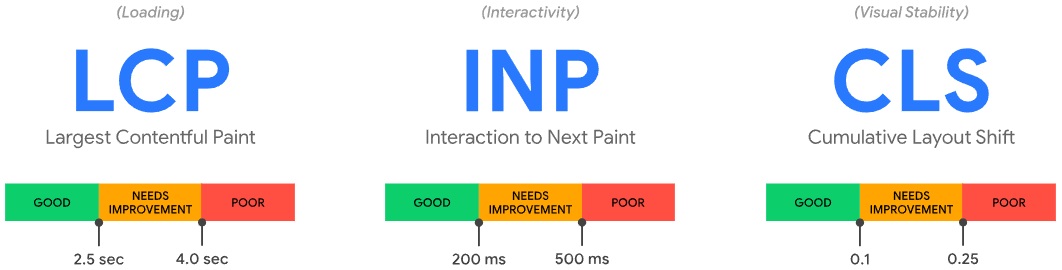
Open the Web Performance reports in your Shopify admin. They show Largest Contentful Paint (LCP), Interaction to Next Paint (INP) and Cumulative Layout Shift (CLS), all measured at the 75th percentile, as Shopify's performance overview explains. Then run PageSpeed Insights on a few representative money pages: your best product, your top collection and your homepage.
The usual culprits are predictable:
- Oversized source images: resize them before upload and compress them.
- Offscreen images that load immediately: lazy-load everything below the fold.
- Third-party scripts left behind by apps you no longer use.
- Heavy templates with sliders, popups and autoplay video above the fold.
Aim for at least 75% of page loads to land in the "Good" range for each metric.
Pro Tip:Change one thing at a time and note the date. When a metric moves, you will know which fix did it.
How do you validate product schema and catalog data?
Inspect the structured data your theme and apps actually output. Test a product URL in Google's Rich Results Test, compare prices and availability with the visible page, and include review data only when it exists and meets the applicable guidelines. Theme support alone does not prove complete or valid markup.
Then audit the catalog itself:
- Fill in titles, descriptions, images, availability and product type for every active product.
- Add GTIN or UPC codes wherever they apply.
- Review metafields and category assignments, because Shopify's Standard Product Taxonomy pulls in predefined attributes based on the category you choose.
- Check that price and stock status match what shoppers see on the page, since mismatches create confusing search results.
This matters beyond classic search. Shopify's enterprise technical SEO guide points out that product data and taxonomy now feed AI shopping systems too, so consistent attributes help you in both places.
How do you decide which SEO fixes come first?
Fixes compete for the same hours, so rank them by revenue. Combine Shopify Analytics revenue with Search Console clicks and impressions to find your money pages: the URLs that earn the most sales and the ones with high impressions but weak click-through.

Then place each issue on a simple grid comparing impact against effort. High impact and low effort goes on this week's list. High impact and high effort gets scheduled. Low impact and high effort waits.
Typical priorities look like this:
- Restore indexing on a high-revenue product that dropped out of Google.
- Rewrite templated meta titles on a collection with many impressions and few clicks.
- Remove heavy scripts from a top landing page.
Pro Tip:Record baseline clicks, impressions and revenue before you change anything, then recheck after search engines recrawl the page.
Shopify's SEO checklist takes the same approach: combine Search Console, Shopify Analytics, PageSpeed Insights and a crawler, and handle product and catalog fixes early.
What tools and schedule keep Shopify SEO healthy?
You do not need a large stack. Keep Google Search Console, Shopify Analytics with the Web Performance reports, the Rich Results Test, PageSpeed Insights and one site crawler such as Screaming Frog.
Run them on a steady rhythm:
- Weekly: scan Search Console for new indexing errors and sudden drops in impressions.
- Monthly: run a full crawl and inspect your sitemap status.
- Quarterly: audit content depth and catalog completeness.
- After every change: recheck within days of a theme update, app install, bulk CSV import or product migration.
Pair impressions and click-through rate with revenue so you notice when a page that earns money starts slipping, not just when traffic dips somewhere unimportant.
How do you handle mobile SEO on Shopify?
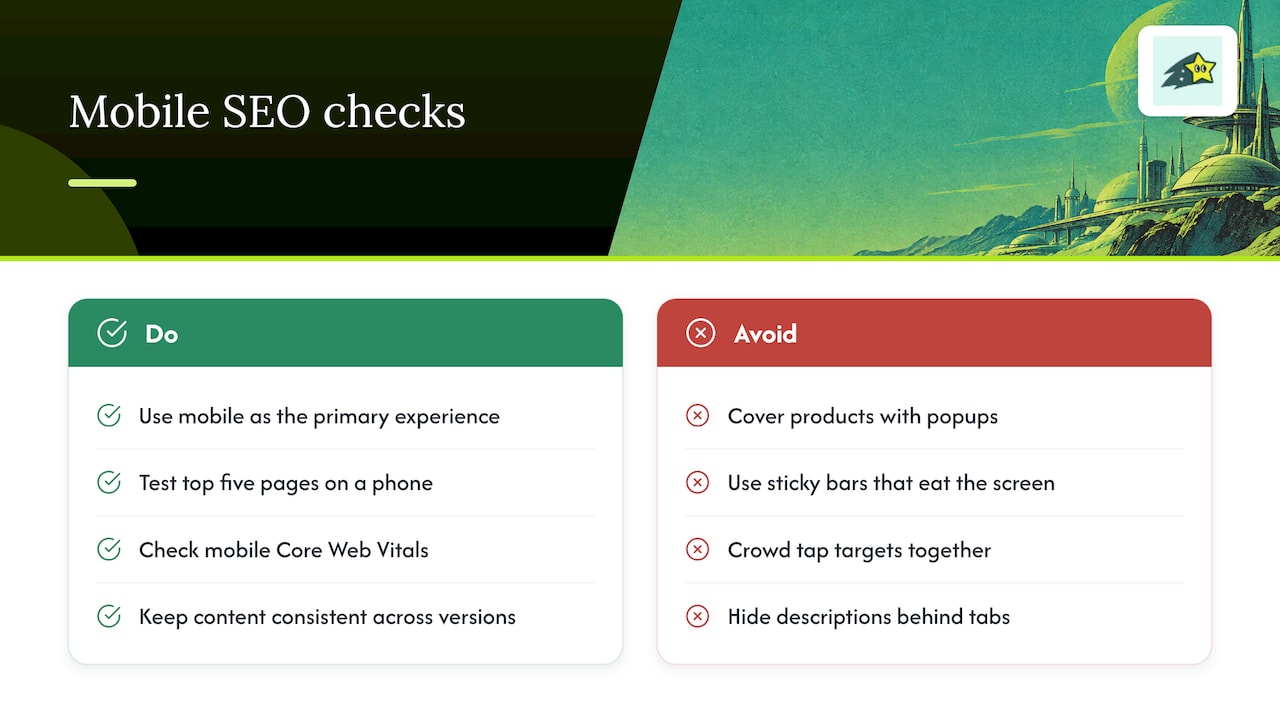
Google evaluates the mobile version of your pages, and most Shopify shoppers browse on phones, so treat mobile as the primary experience rather than a secondary check. Modern Shopify themes are responsive by default, which means problems usually come from what you add on top: popups that cover the product, sticky bars that eat the screen, and tap targets crowded together.
Test your top five money pages on a real phone, not just a desktop browser resized. Check that the add-to-cart button is visible without scrolling past a wall of badges, that product images load quickly on a cellular connection, and that text is readable without zooming. Look at the Core Web Vitals split between mobile and desktop in your reports, because mobile numbers are often worse and are the ones that count most.
Keep equivalent product information, headings, images and structured data on mobile and desktop. Tabs and accordions can save space without removing content, provided Google can render it without requiring a user interaction to load it. Use Search Console URL Inspection to check the mobile-rendered page. See Google's mobile-first indexing guidance.
What internal linking works best for ecommerce SEO?
Internal links tell search engines which pages matter and help shoppers find what they want. In a store, the structure is mostly built from navigation, collections and product pages, so linking deliberately on top of that pays off.
Start with your money pages. Link to your best-selling collections from the main menu and the homepage, and link from collection pages to their top products. Add "related products" and "complete the look" blocks on product pages so strong pages pass attention to newer or weaker ones. Blog posts and buying guides should link to the specific collection or product they discuss, with anchor text that describes the destination, such as "waterproof hiking boots" rather than "click here."
Keep the structure shallow. A shopper, and a crawler, should be able to reach any product easily from the homepage. Watch for orphan products that sit in no collection, and for products buried deep in paginated lists. When you move products between collections or change variant structures, recheck the links, because Shopify's audit checklist flags these internal catalog changes as common, easy-to-miss triggers of crawl and duplicate content problems.
How do apps and scripts affect Shopify SEO?
Apps are the most common source of silent SEO regressions. Each one can add JavaScript, extra stylesheets, injected markup or duplicate schema, and the cost shows up in your performance reports long after installation. Shopify's technical audit checklist notes that although Shopify automates much of the technical setup, apps, themes and catalog updates commonly introduce issues.
Audit your installed apps every quarter and ask three questions of each: does it still earn revenue, does it load code on pages where it is not needed, and did it leave anything behind after you uninstalled it? Leftover snippets in the theme are a classic problem, so search your theme files for references to apps you removed.
Before installing anything new, record your Core Web Vitals on a key page, install the app, and measure again. If LCP or INP slips noticeably, look for a lighter alternative or limit the script to the pages that need it. Also check whether an app outputs its own structured data, since a second review or product schema block can conflict with your theme's. Fewer, well-chosen apps beat a long list of small conveniences.
How do you handle pagination and faceted navigation in Shopify?
Large collections spill across several pages, and filters multiply the URLs further. Left unmanaged, that creates thousands of near-duplicate pages competing for crawl attention while your real products wait their turn.
For pagination, make sure each paginated page can be reached through plain links, so crawlers can follow them to products deeper in the list. Keep the first page of a collection as the main target for ranking, with unique descriptive copy at the top, and avoid putting heavy text on page two onward.
Decide which filter combinations deserve search visibility. Valuable categories can become dedicated collections with useful titles and copy. Review crawl rules and canonical signals for other variants. Robots.txt controls crawling, not guaranteed removal from the index; blocking a URL can prevent Google from seeing a noindex directive. Test changes carefully and monitor Search Console.
What should you know about international SEO on Shopify?
Selling in more than one country adds a layer of SEO decisions. Shopify Markets lets you serve different regions and currencies, and Shopify's international SEO guidance covers how those setups appear to search engines. The central idea is simple: each language or regional version of a page should point to its siblings, so Google shows the right one to the right shopper. That signal is called hreflang.
Check three things. First, confirm that regional URLs resolve and are not blocked from crawling. Second, translate more than the visible text: titles, meta descriptions, alt text and URL handles all need localizing, or you will end up with mixed-language results. Third, make sure currency and availability shown on each page match the region, since mismatches confuse both shoppers and search engines.
Avoid creating regional versions you cannot maintain. A half-translated catalog with stale prices can confuse shoppers. Start with the markets that already send you traffic and orders, then expand.
Why recurring audits beat one-off fixes
In my view, a one-time cleanup is the least valuable thing you can do for your store's SEO. Stores rarely break because of a single big mistake. They drift: a theme edit here, a new app there, a bulk import that quietly overwrites metadata. The fix that mattered in March is undone by June.
What works is a repeatable audit that pairs Search Console signals with sales data, so you always know which problem is costing money. At Cromojo, we built our platform around exactly that link between SEO issues and revenue.
Catch SEO problems before they cost you sales
Use these checks as a recurring workflow. Explore Cromojo's Automated Indexing, Website Monitoring and Revenue Analytics for your store. Submission does not guarantee indexing or rankings. Keep Search Console as the check for Google indexing status, and distinguish attributed revenue from proof that a particular SEO change caused a sale.
You spot indexation and catalog problems sooner and spend your hours where revenue is at stake. Explore our platform or see our pricing to find the plan that fits your store.