

Google Ads revenue attribution is the process of deciding which ad interactions get credit for the money a sale brings in. Google Ads gives you its own answer inside the platform. The most reliable check is to compare that answer with revenue from the system that records the payment, such as Stripe or Shopify.
This guide explains what Google Ads actually reports, why its numbers rarely match your store, and how to build a simple setup you can trust when you decide where to spend.
What Google Ads revenue attribution actually measures
When someone buys, they have often clicked more than one ad first. Google's documentation describes the problem plainly: people may interact with several of your ads before a purchase, and traditionally the last interaction got all the credit. An attribution model is the rule that decides how that credit is split.
Two things matter here:
- Credit, not cause. A model assigns credit using rules or machine learning. It does not tell you whether the sale would have happened without the ad.
- Credit within the configured scope. Check the conversion source and creditable channels. Native Google Ads tracking and imported analytics conversions can use different scopes; do not assume every action represents a complete cross-channel journey.
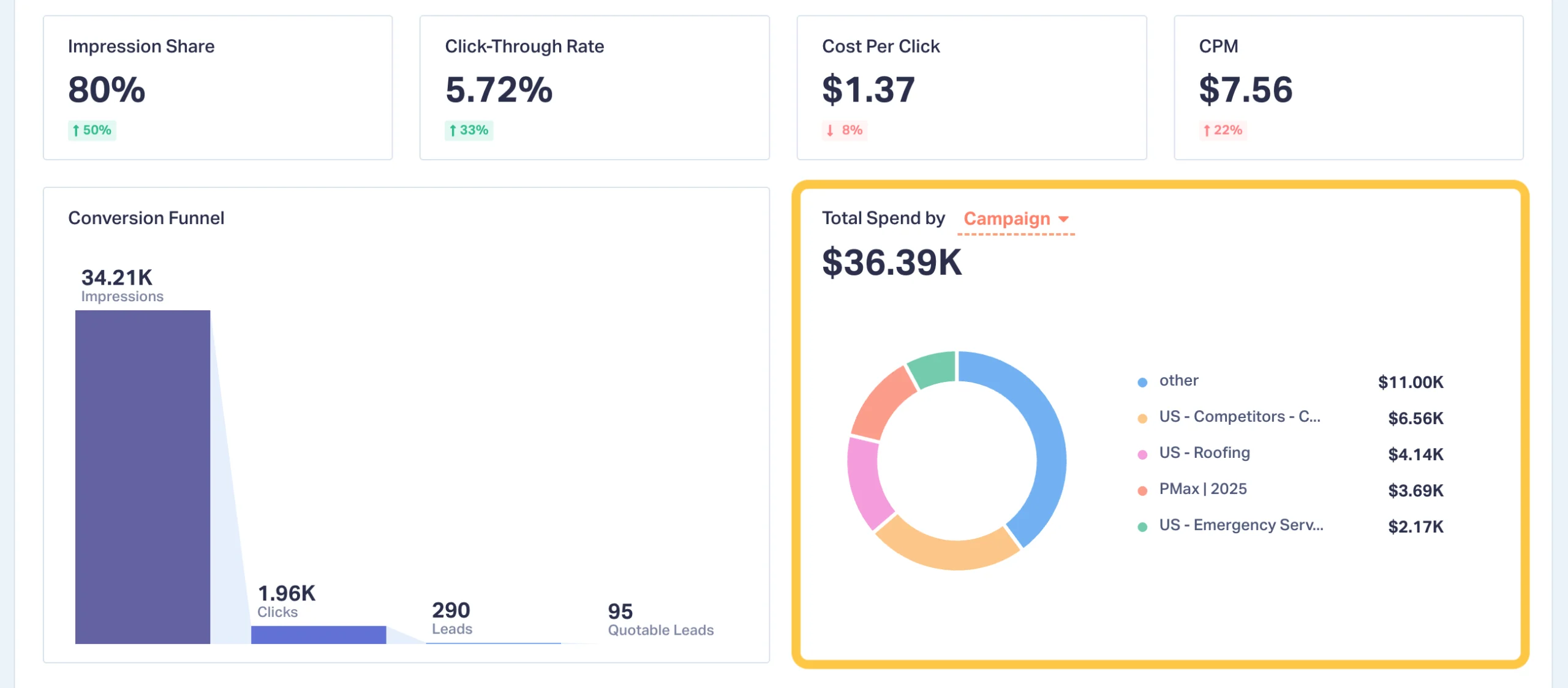
So "Google Ads revenue" in your account means: revenue from conversions that Google credits to your ads, according to your conversion settings. That is useful for managing campaigns. It is not the same as revenue your business earned because of those campaigns.
The models: what is left and what changed
If you read older guides, you will find lists of five or six models. That has changed. Google's help page now states that the first click, linear, time decay and position-based models are no longer supported, and conversion actions that used them were upgraded to data-driven attribution.
In practice you now choose between two:
Google introduced data-driven attribution as the default for new conversion actions in 2021, explaining that machine learning fills gaps in observed data. That is a strength and a limit: the model estimates, and the estimate is only as good as the data you give it.
What about "50/50 attribution," which people also search for? It is a manual rule where two touchpoints split credit evenly. Google Ads does not offer it as a model, so if you want that view you need to build it in a spreadsheet or a separate analytics tool.
Why Google Ads, GA4 and your store disagree
Ads, GA4 and Shopify can show different revenue for the same period. Some differences follow their definitions; others reveal missing or duplicate events. Reconcile the settings before deciding a discrepancy is expected.
The usual reasons:
- Different attribution rules. One tool credits the last click, another spreads credit across the path.
- Different lookback windows. A sale 25 days after a click may count in one tool and not in another.
- View-through and cross-device reporting. Cross-device measurement and modeling can affect totals. View-through conversions have a separate reporting column and are not simply added to the standard Conversions column. Inspect the actual columns and campaign settings.
- Consent and blocked tracking. Visitors who decline cookies are missing or modeled in some tools.
- Refunds and cancellations. A checkout event can differ from a paid order, settled payment or revenue net of refunds. Neither system automatically guarantees the definition you need.
There is no universal acceptable percentage gap. Define an expected reconciliation range for your setup, investigate duplicate purchases and missing events, and record explanations rather than accepting a stable discrepancy as proof of accuracy.
Keep channel attribution separate from transaction totals. Several platforms may claim the same purchase under different rules. Add up unique paid orders in the transaction system, then apply a consistent attribution model for channel comparisons.
Pick a source of truth
The fix for conflicting numbers is a hierarchy, not a perfect match.
- Source of truth: the system that records the transaction. For most ecommerce and SaaS businesses that is Stripe or Shopify. A sale either happened and was paid, or it did not.
- Directional tools: Google Ads, GA4, your email platform. Use them to see trends, compare campaigns inside the same tool, and run optimizations.
- Rule of use. Compare Google Ads to Google Ads over time. Compare channels against each other using the payment-based figures.
For example, Ads might report $12,000 in conversion value while Shopify attributes $9,400 to paid Google traffic. The $2,600 difference is a reconciliation question, not a verdict. Align currency, time zone, transaction versus interaction date, windows, revenue components and refunds; then inspect order IDs and conversion sources. Shopify channel credit is also model-dependent. A stable gap alone does not establish accuracy or incremental return.
Send real revenue back to Google
Attribution is not only a reporting question. Google's bidding uses your conversion data to decide whom to show ads to. Google's own guidance says that a robust conversion measurement strategy is one of the most important things you can do to help its AI, and that conversion values align bidding with your business goals.
The practical consequences:
- Pass a value with each purchase. If every conversion counts as "1," Google cannot tell a $20 order from a $900 one. With values, you can move from volume-based bidding such as Target CPA to value-based bidding such as Target ROAS.
- Use enhanced conversions where appropriate. Enhanced conversions use hashed first-party customer data to improve matching. Follow Google customer-data policies and applicable consent requirements; hashing does not make the data anonymous or guarantee complete coverage.
- Import offline sales when the sale happens later. If you capture leads online and close them in a CRM, the ad account only sees the form fill unless you import the closed deal. Otherwise automated bidding may chase cheap leads that never become revenue.
Validate purchase value and currency, use a stable transaction ID, and test retries and refunds. If both a native Ads purchase action and a GA4 import represent the same sale, choose the intended primary bidding goal and keep comparison actions secondary where appropriate. Avoid counting the same sale twice across conversion actions or import routes.
Attribution is not incrementality
Even perfect revenue tracking cannot answer one question: would these customers have bought anyway? Branded search is the classic case. Someone who already knows you searches your name, clicks the ad, and buys. Every model credits the ad. A good share of those sales might have arrived through the free listing right below it.
Attribution distributes credit; it does not establish the counterfactual. A properly designed holdout or conversion-lift experiment can estimate incremental sales. Plan assignment, sample size, duration and uncertainty. A short campaign pause or regional before-and-after comparison can be confounded by seasonality, promotions and regional differences, so treat it as directional evidence unless the design supports a causal conclusion.
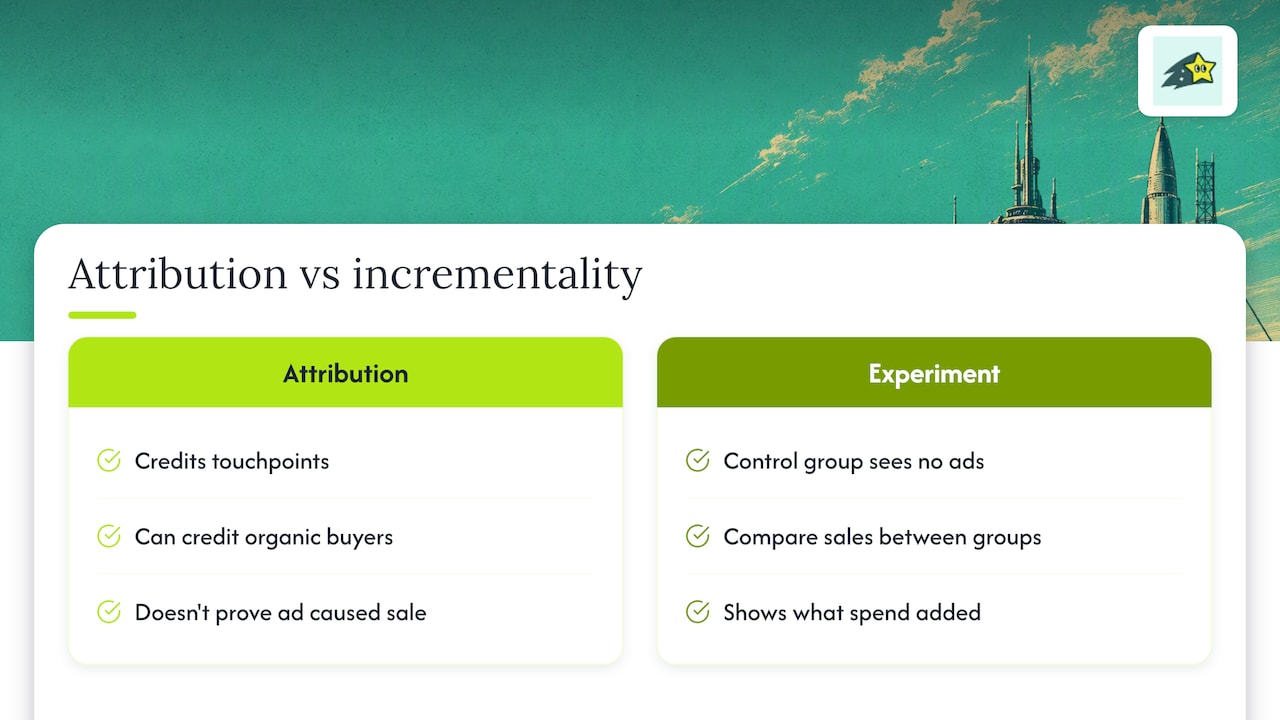
Keep the claims modest. Attribution tells you where credit lands. Experiments tell you what the spend added.
Where Google Ads fits among your other channels
A payment-based view also helps with the other things people search alongside Google Ads attribution.
Direct traffic. Missing campaign parameters, returning visits and privacy restrictions can leave sales without a known source. A rise in direct revenue alongside ad spend is correlation, not evidence that ads caused those sales. Inspect journeys and tagging, and keep unattributed revenue visible.
Organic search. Compare landing-page performance with attributed purchases. Individual organic search queries are generally unavailable for buyer-level matching; Cromojo estimates organic keyword revenue using Search Console click share. Treat that estimate separately from observed purchases.
Email. Open-based, click-based and other attribution windows can overlap with ad-platform credit. Check the provider settings and use one consistent channel model rather than summing each platform's attributed totals.
The goal is not to crown a winner. It is to see how channels work together and to avoid cutting a quiet channel because a last-click report ignored it.
Our perspective: check the ad platform against the cash register
We built Cromojo because we kept seeing the same pattern: teams argued about which dashboard was right while nobody looked at the money. Our view is simple. Traffic reports and ad platform reports tell you what people did and how the platform assigns credit. Revenue tells you what your business received.
Cromojo connects recorded website activity to supported Stripe or Shopify purchases. Attribution depends on tracking coverage and checkout matching; some purchases remain unmatched. Organic keyword revenue is estimated from Search Console click share. Cookie-free analytics is the default, while optional returning-visitor tracking uses cookies and browser storage.
Review platform reporting alongside payment-based attribution regularly. Track reconciliation gaps, investigate known faults even when the gap is stable, and annotate changes to tags, windows and conversion actions before interpreting trends.
A practical setup in five steps
- Define the conversion that matters. For a store, that is a purchase with its value. For lead generation, it is a qualified lead or closed deal, not just a form submission.
- Check your attribution model and window. Open the conversion action settings in Google Ads and confirm the model and the lookback window. Write them down so you remember why numbers differ from other tools.
- Tag your campaigns consistently. Use the same naming and UTM conventions across channels so your analytics tool can group revenue correctly.
- Connect a payment-based source. Configure the supported Stripe or Shopify checkout reference, test a purchase and refund, and inspect matched and unmatched transactions. Keep recorded campaign terms separate from estimated organic keyword revenue.
- Review and test deliberately. Reconcile regularly and plan incrementality experiments when traffic, budget and the decision justify them. A calendar deadline alone does not make a test adequately powered.
See revenue by channel with Cromojo
Cromojo revenue analytics offers payment-based attribution by recorded page, source and campaign, with estimated organic keyword revenue. Confirm supported integrations, feature access and current plans on the pricing page. Use it alongside Ads for campaign optimization, with the measurement limits visible.