Choose ecommerce monitoring around the failures you need to detect and the person who can respond. Developer error trackers, full-stack observability, availability checks and scripted purchase-journey tests cover different layers. Revenue analytics adds business context, but does not by itself identify every checkout failure or measure the sales an error caused you to lose.
This guide compares the main options on what matters to a store: what they catch, how they price, and how much work they take to run.

What ecommerce error monitoring has to do
Generic monitoring asks one question: is the site up? An online store needs three, and New Relic's ecommerce guide frames them well: is it available, is it functioning correctly, and is it fast enough?
The second question is where stores lose money quietly. A server can respond with a healthy status code while the Add to Cart button throws a JavaScript error or a payment callback stalls. Industry guides describe these as silent functional failures: the site is technically up and the revenue path is closed. A basic uptime ping will never see them.
Test performance throughout the purchase journey, especially cart and checkout. Slow responses can create friction, but a slowdown does not prove that every affected shopper would otherwise have placed an order. Compare performance, errors and conversion data before estimating impact.
So a good ecommerce monitoring setup should do five things:
- Catch front-end errors (JavaScript, failed requests) in real browsers, not just server errors.
- Watch availability, so you know about downtime before customers tell you.
- Connect problems to the pages and steps that matter: product, cart, checkout, confirmation.
- Alert the right person through the right channel, without noise.
- Show the revenue consequence, so you can decide what to fix first.
No single tool is strongest at all five for every kind of team. That is why the comparison below sorts tools by who they suit.
The main options at a glance
Prices for the third-party tools come from the sources cited in each section and can change, so confirm on the vendor's pricing page before you commit.
Cromojo: errors and uptime, measured in revenue
We build Cromojo, so weigh our comparison accordingly. Its website monitoring covers uptime, SSL, DNS, domain expiry, broken links and page performance. Pair it with code-level error capture and scripted checkout tests where those are required; it is not a substitute for either.
Use page revenue as a prioritisation signal when investigating an outage. It does not establish how much revenue the incident caused you to lose. An estimate needs assumptions about affected traffic, normal conversion and alternative paths.
What it covers:
- Website monitoring: availability, certificates, DNS, broken links and page performance. Confirm scan coverage and alert configuration for your plan.
- Revenue attribution: recorded activity matched to supported purchases; organic keyword revenue is estimated, and coverage depends on checkout matching.
- Real-time reporting, so you notice a drop while it is happening, via Real-time Analytics.
- Conversion funnels and visitor journeys, which show where shoppers drop out between landing page and order.
- Cookie-free collection does not automatically remove privacy obligations. Check optional returning-visitor storage, consent and the actual implementation.
- Check supported URL-submission workflows. Submission does not guarantee indexing, rankings or a recovery time.
Check current feature limits, usage and tracked-site allowances on the pricing page. Model traffic and monitoring requirements before choosing a tier.
Who it suits: small and mid-sized stores without a full engineering team, marketers who own the numbers, and agencies watching many client sites from one place.
Who should pair it with something else: if your developers need stack traces, source maps and release tracking at the code level, add a developer-focused tool such as Sentry alongside it. The two answer different questions, and many stores run both.

Sentry: the developer's default for triage
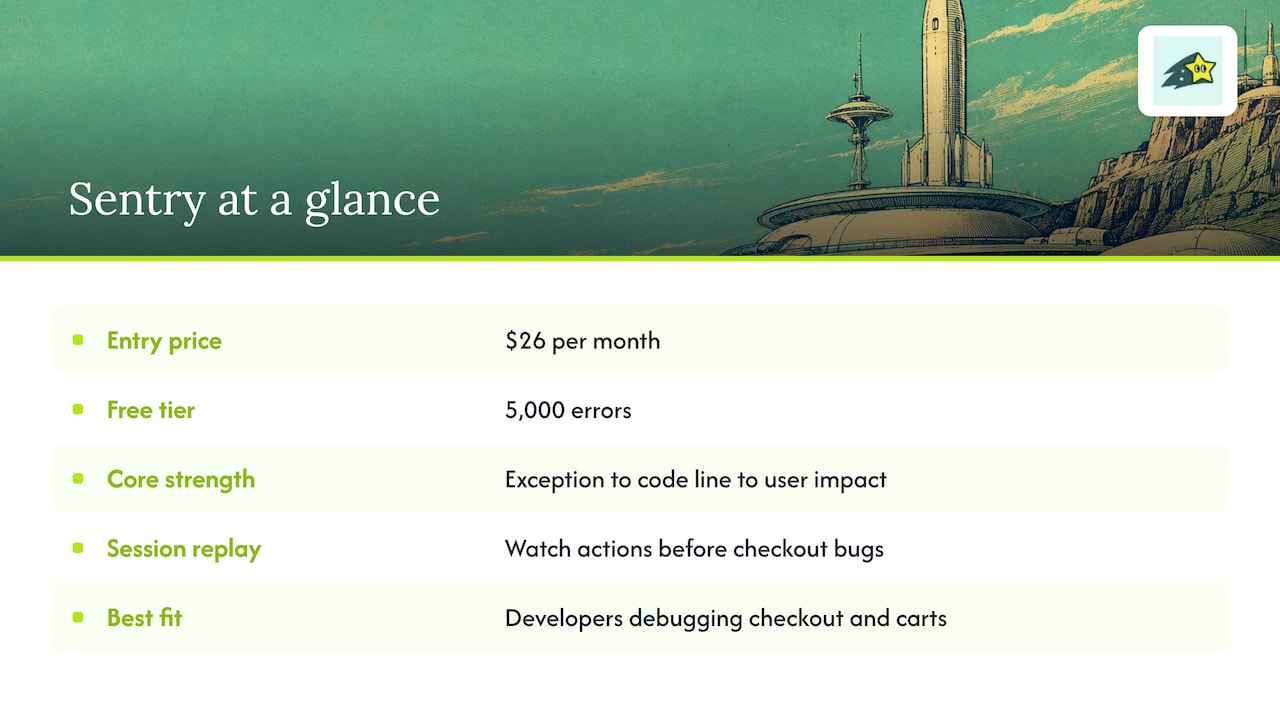
Sentry is a developer-focused option for application errors and debugging. Check SDK support, source-map handling, release context, replay coverage and alert workflows against your stack. Verify current plans and quotas on Sentry's pricing page rather than relying on an entry price from a roundup.
For ecommerce, the draw is session replay linked to errors. A developer can watch what a shopper did before a checkout bug appeared, which cuts reproduction time sharply. WhatAreTheBest rates it as a fit for front-end and mobile developers debugging checkout errors and abandoned carts.
The caveat is audience. Sentry assumes someone on your side reads stack traces. If you run a Shopify store with no developer, you will receive technically accurate alerts you cannot act on. It also does not, by itself, tell you what an error cost in sales unless you build that connection.
Pick it if: you have developers who fix user-facing bugs daily and want the deepest debugging detail.
Datadog and New Relic: when you run a whole stack
Datadog and New Relic offer broad observability products. Compare the metrics, logs, traces, browser monitoring and synthetic checks your architecture needs, plus retention and ingestion charges. A single headline price is not a useful comparison across different product bundles.
These tools make sense when your store is one part of a larger system: custom microservices, headless commerce, multiple cloud services that have to be correlated. Apptension notes that teams running several cloud-native services may find Datadog's correlation worth the investment despite the price.
For a typical small or mid-sized storefront on a hosted platform, they are more than you need. You would pay for, and configure, capability you will not use, and the person who benefits is an engineer, not the store owner.
Pick them if: you have dedicated platform or DevOps staff and a custom architecture.
Bugsnag and Rollbar: focused and budget-friendly
BugSnag and Rollbar are developer-oriented error-monitoring options. Review supported platforms, grouping, release tracking and response workflows. Check current BugSnag pricing and Rollbar pricing for event allowances, replay, retention and billing terms.
Both do the core job: capture errors, group them, notify your team. Bugsnag is often favored for automatic prioritization and mobile apps. Rollbar is attractive when the budget is tight. Neither is built around ecommerce, so you will do more of the work of defining which errors are checkout-critical.
How to choose: match the tool to who fixes the problem
Experts quoted in the Apptension comparison make a point worth repeating: the best tool depends on your existing architecture and goals. Ask these questions in order.
- Who will act on an alert? A developer needs stack traces. An owner or marketer needs plain language and a revenue figure.
- What platform are you on? Hosted platforms limit what you can instrument. A lightweight script that works anywhere reduces friction.
- What is the cost of an error? If you cannot say what an hour of checkout downtime costs, you cannot decide how much monitoring to buy.
- How will the bill scale? Traffic spikes during sales are exactly when error volume rises.
- Do you need one tool or two? Many stores combine a revenue-aware monitor with a code-level tracker.
Quick recommendations
Watch the bill: how events are counted
Billing units vary: occurrences, sessions, replays, traces, hosts, ingestion and seats may be charged separately. Do not assume a special crash event has a fixed multiplier across vendors. Read the applicable product's current counting and overage policy.
Before you pick a tier:
- Read the vendor's event-counting policy, not just the headline price.
- Estimate error volume during your busiest week, not an average one.
- Check whether replays, traces and extra features are billed separately from errors.
- Find out what happens at the limit: dropped events or automatic overages.
For Cromojo, compare the published usage limits and supported monitoring features against your expected volume. Confirm any overage terms rather than assuming every cost follows pageviews alone.
Perspective: why we measure errors in revenue
Most monitoring is built by engineers for engineers, and it shows. It reports what is technically wrong, ranked by how often it happens. A store owner needs a different ranking: what is wrong, ranked by what it costs.
Use attributed revenue alongside error and availability data to prioritise investigations. Organic keyword figures are estimates; tracking gaps and unmatched purchases limit coverage. Neither an attributed purchase nor a revenue drop establishes that a particular error caused a lost sale.
Small teams benefit from clear ownership and tools they can maintain. Review site health alongside analytics, and add debugging and transaction-test coverage according to the failures your platform allows you to observe.
Our honest advice: start with what is visible. Know your revenue pages, know when they break, and add code-level tooling when your developers ask for it, not before.
Set up monitoring around the purchase journey
Tools matter less than how you configure them. Monitoring guidance for 2026 recommends mapping your strategy to your most important customer journeys, from landing page to order confirmation. Here is a practical sequence.
- List your revenue pages. Landing pages, top product pages, cart, checkout, order confirmation. Rank them by the revenue they influence.
- Monitor availability on each. A single homepage ping is not enough.
- Test the functional path. Generic uptime checks miss a broken Add to Cart button or a stalled payment callback. Scripted tests that walk the purchase journey catch them.
- Tag by severity. Without custom tags, teams drown in noise. The same guide advises sending checkout failures to a dedicated on-call channel and moving minor cosmetic issues into a daily summary.
- Set a response plan. Decide who is notified, who fixes, and how you confirm recovery. Detection without response design does not restore revenue.
- Review weekly. Look at which errors recurred and which pages lost sales.
Alert fatigue is the most common failure. If every warning pages someone, people stop reading. Treat revenue-impacting problems as urgent and everything else as a report.
Don't forget search visibility
After a repair, verify status codes, redirects and indexability in the relevant search-engine tools. URL submission does not guarantee indexing or a faster return to search results.
Try revenue-aware monitoring on your own store
Trial Cromojo for website health and revenue context, then test any code-level or checkout monitoring separately. Review current plans and Website Monitoring coverage. For help investigating conversion friction, see Conversion Optimization Services.