

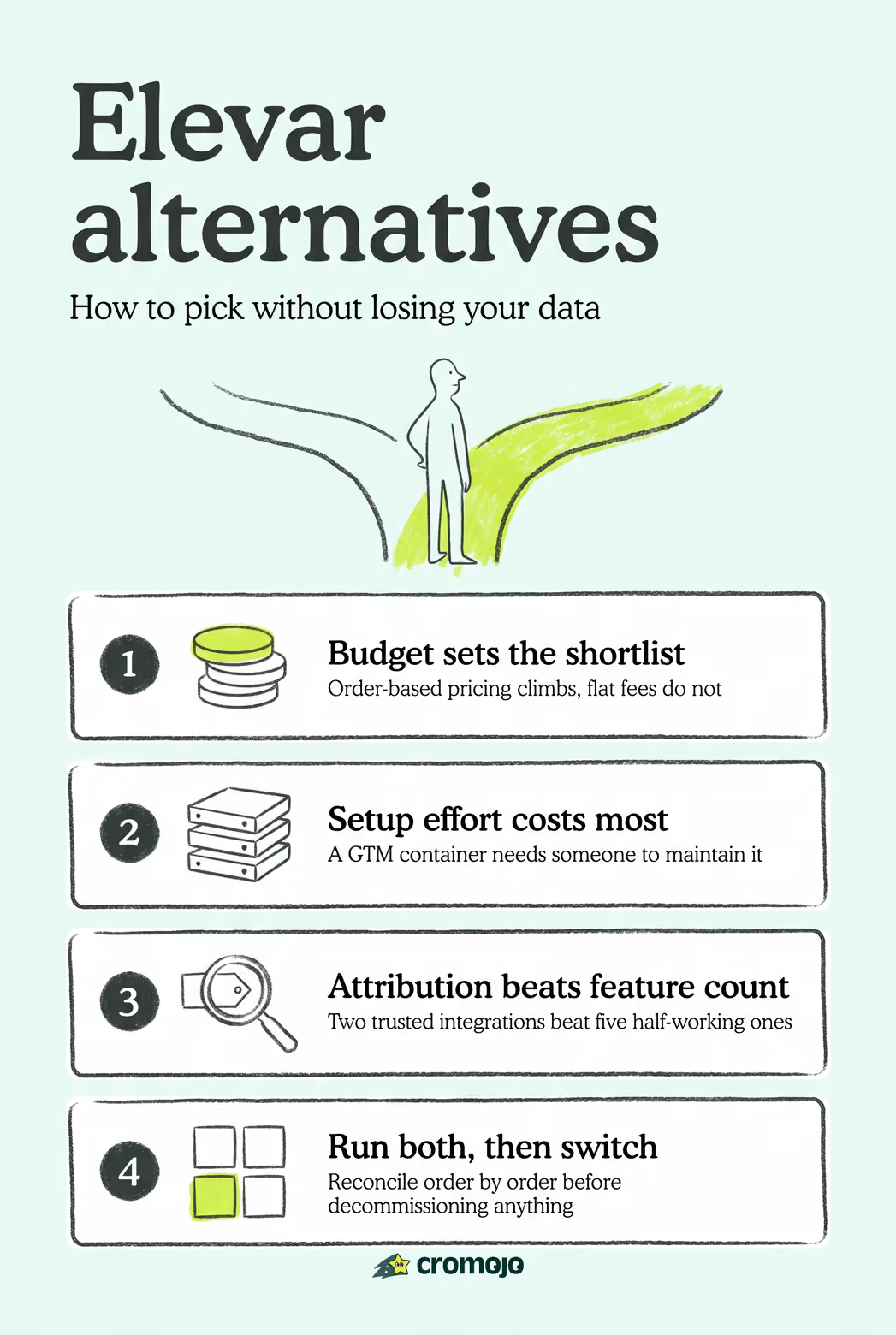
If you need real-time revenue attribution and site monitoring baked into one dashboard, Cromojo is the pick. If cost is your main friction point with Elevar, TagFly offers flat-fee pricing instead of order-based scaling. If your team wants full control over a server-side GTM container, Stape gives you that flexibility without building infrastructure from scratch.
The right elevar alternatives comparison always comes down to three tradeoffs: how much you want to pay, how much technical setup you can tolerate, and how much hands-off support you need. Merchants leave Elevar for one of three reasons: the pricing scales awkwardly with order volume, the maintenance overhead outgrows their team's bandwidth, or they need platform coverage Elevar doesn't prioritize.
- Low-cost, app-first pick: TagFly, for merchants who want multi-destination tracking without order-based pricing creep.
- Developer-controlled pick: Stape, for technical teams that want a hosted server-side GTM container they can configure directly.
- Revenue-first pick: Cromojo, for merchants who care more about attributing actual dollars to channels than about raw event volume.
Cost buys you simplicity, control buys you precision, and a revenue-first platform buys you clarity on what's actually driving sales.
Key Takeaways
Merchants who validate attribution accuracy through a parallel run before cutover avoid the conversion data loss that undermines most tracking migrations.
Where to Verify Reviews and Start a Trial
- Littledata on the Shopify App Store for installed-merchant reviews and pricing tiers.
- TrackBee's alternatives roundup for setup comparisons.
- SaaSHub's Elevar alternatives page for a broader category breakdown.
What Does Elevar Actually Do for Shopify Stores?
Elevar sits between your Shopify store and your ad platforms, forwarding conversion events server-side so tracking survives iOS privacy changes and ad blockers. It enriches Shopify checkout data, stitches sessions and identities together across devices, and manages this through a Google Tag Manager (GTM) container approach that gives technical teams granular control over what fires where.
Merchants outgrow or abandon Elevar for a mix of reasons. Pricing that scales with order volume can get expensive fast for high-volume stores, and the pricing model gap between flat-fee tools and order-based scaling is the most cited reason merchants go looking for elevar competitors in the first place. Maintenance overhead is the second most common complaint: GTM containers need upkeep, and not every marketing team has a developer on standby.
Before you commit to any elevar replacement, confirm it covers:
- Checkout event capture (not just page views and add-to-carts)
- Subscription and recharge lifecycle events, if you sell subscriptions
- Deduplication logic so Meta and Google don't double-count conversions
- The specific ad and email destinations you actually use (Meta, Google/GA4, TikTok, Klaviyo)
Skip any of these and you'll spend the next quarter chasing phantom attribution gaps instead of running your business.
Which Elevar Alternatives Actually Fit Your Store?
Twelve tools cover the realistic range of options, from zero-maintenance Shopify apps to fully managed done-for-you setups. Cromojo leads this list because it pairs revenue attribution with site monitoring, letting you see not just which channel drove a sale but whether your site was even healthy when that sale happened. That combination matters more than most attribution tools admit: a tracking gap and a site outage look identical in your ad dashboard, but they need completely different fixes.
Reading the table left to right, a pattern emerges: price and setup complexity move together more often than not. The flat-fee, no-code tools (TrackBee, TagFly) trade some customization for speed. The managed and enterprise tools (Northbeam, Hyros, Analyzify) trade higher cost for hands-off execution. Cromojo sits in the middle of that spectrum, no-code but not shallow, because the emphasis is on revenue clarity rather than raw event plumbing.
A few notes worth knowing before you demo any of these:
- Cromojo typically installs in under an hour through a lightweight script, no GTM container required, and starts showing revenue-by-channel data within the first day.
- Littledata setup runs 2 to 4 hours depending on how many Recharge subscription flows you need mapped, and its main caveat is that non-subscription stores get less value from its specialty features.
- TrackBee installs in minutes as a native Shopify app, but merchants report less flexibility for custom event definitions than a GTM-based tool offers.
- Stape setup takes a developer 1 to 2 days to configure properly, and the tradeoff is you're managing infrastructure Elevar would have managed for you.
- TagFly onboarding is fast, generally under a day, though some merchants note fewer advanced attribution features than the pricier alternatives.
- Analyzify and Aimerce both run on service timelines set by their teams, often one to two weeks, since a person configures your setup rather than you clicking through a wizard.
- Northbeam and Hyros require the longest onboarding, often two to four weeks, because their attribution models need historical spend data to calibrate properly.
- Triple Whale and Cometly land in between: a few days to a week, with the caveat that dashboard customization takes longer than the base install.
- Blotout setup is developer-heavy and closer to Stape's timeline, with the tradeoff being full data ownership in exchange for more engineering work.
Aggregated alternative lists show the market has splintered into specialists rather than one-size-fits-all tools, which is exactly why matching your store profile to the right category matters more than chasing the "best" tool in the abstract.
How Do You Pick the Right Elevar Replacement?
Start with a budget number, not a feature list. Decide what you're willing to pay monthly before you take a single demo call, because pricing conversations tend to expand to fill whatever room you leave them.
Run through this checklist before signing anything:
- What's your realistic monthly budget, and does it hold if your order volume doubles?
- Do you have in-house technical capacity, or does everything need to be no-code?
- Which channels do you actually advertise on: Meta, Google, TikTok, and does email (Klaviyo) matter?
- Do you run subscriptions or recharge programs that need lifecycle event tracking?
- Do you manage multiple stores, and does the tool price per site or bundle them?
- What SLA do you need for support response time if tracking breaks during a launch?
On the demo call itself, ask vendors these questions directly: How long is data retained? How does deduplication work between server-side and pixel-based events? Is there a test mode you can validate before going live? What migration support exists for pulling in historical data? Does the platform support SSO for team logins? How is consent and privacy data handled for EU or California traffic?
Watch for a few red flags. A trial period under 14 days rarely gives you enough traffic to validate attribution accuracy. Opaque overage pricing, where the vendor won't state a per-unit rate in writing, tends to surprise you on the first high-traffic month. And any tool that won't let you export your raw event data is a tool you can't leave without losing your history.
Pro Tip: Never decommission your current tracking the same week you launch a new tool. Run both in parallel for at least seven days and reconcile order-by-order before you trust the new dashboard.
How Do You Switch Without Losing Conversion Data?
Migrating tracking tools is where most merchants lose data, not because the new tool is broken, but because nobody validated the handoff. Independent migration guides consistently recommend a structured parallel run rather than a hard cutover.
- Audit your baseline first. Export your current event schema and pull a 7 to 14 day sample of conversions by channel, noting any existing attribution discrepancies so you're not chasing problems the new tool didn't create.
- Run both systems in parallel. Install the new tool alongside Elevar, build deduplication rules so orders aren't double-counted, and compare purchases by order ID and channel every day for at least a week.
- Cut over during low-traffic hours. Switch DNS settings or swap the app install late at night or early morning, then run a 72-hour reconciliation window watching for gaps.
- Verify everything downstream. Confirm subscription lifecycle events still fire correctly if you use Recharge, check that GA4 and Klaviyo integrations pulled through, and update any dashboards or exports pointing to the old data source.
Skipping the monitoring layer during this process is the most common mistake: a tracking gap and a site outage produce the same symptom in your ad dashboard, a sudden conversion drop, but they need entirely different fixes.
Where Does Cromojo Fit for Shopify Merchants?
Cromojo maps cleanly onto three merchant profiles: stores that need to know which channel actually drove revenue (not just clicks), multi-channel sellers reconciling Meta, Google, and email performance against real Stripe payouts, and stores that need uptime monitoring alongside attribution because a broken checkout page looks identical to a bad ad campaign in raw traffic numbers.
The feature set lines up directly with those needs:
- Real-time revenue attribution by page, keyword, and channel
- Native Stripe and Shopify integrations, so revenue numbers reconcile against actual payments
- Cookieless, privacy-first tracking that doesn't depend on third-party cookies surviving browser updates
- Website monitoring for downtime, errors, and SEO health alongside the analytics layer
The core insight worth sitting with: attribution tools tell you where traffic came from, but revenue attribution tools tell you where money came from. Those are not the same question, and merchants who only track the first one keep optimizing for clicks that never converted.
How Do Contract Terms Compare Across These Tools?
Contract length is one of the least discussed differentiators in any elevar alternatives comparison, yet it's often what determines how painful a bad fit turns out to be. Cromojo runs on a straightforward monthly subscription tiered by pageviews and number of tracked sites, with overages billed per 1,000 additional pageviews rather than a punitive flat penalty, so you're never locked into a long-term commitment you can't exit if your needs change.
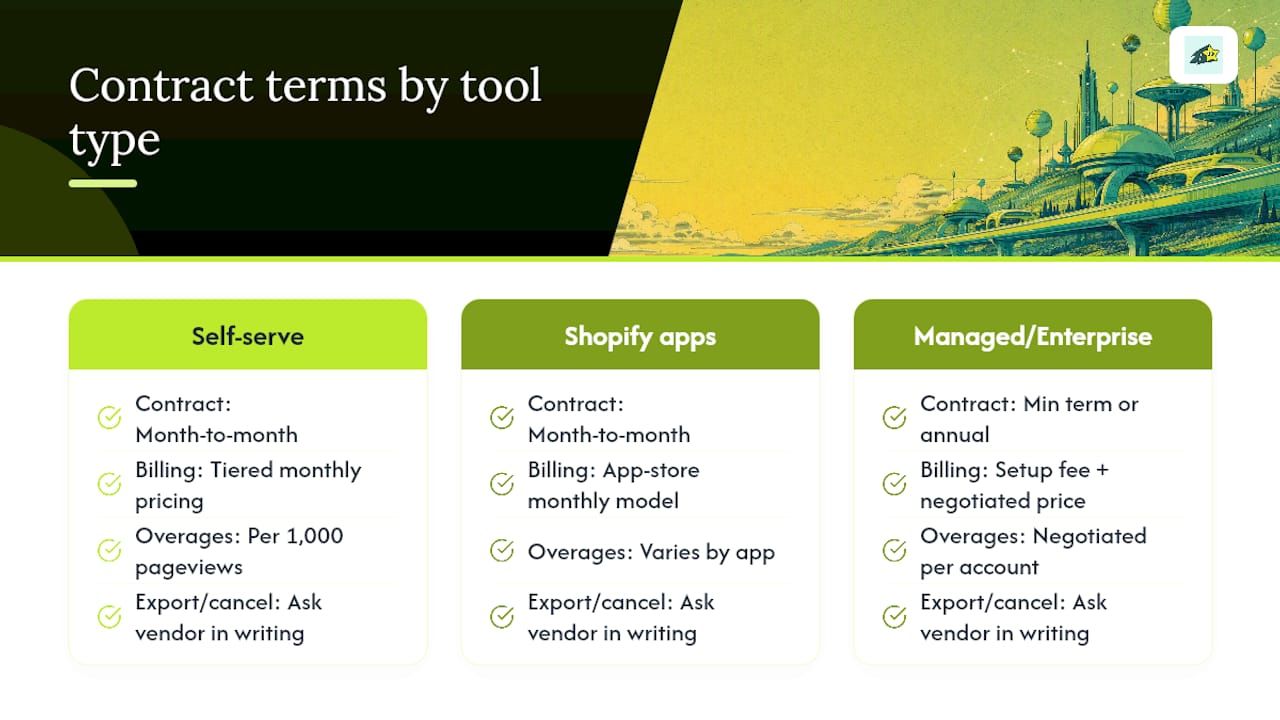
App-based tools like TrackBee and TagFly generally follow the same month-to-month model common across the Shopify App Store, which makes sense given most merchants install and uninstall apps through that same interface. Managed and enterprise tools tell a different story. Analyzify and similar done-for-you services often require a setup fee plus a minimum service term, since a real person is configuring your tracking rather than you clicking through a self-serve wizard. Northbeam and Hyros, aimed at higher ad spend brands, frequently structure contracts around annual commitments with the pricing negotiated per account rather than published as a flat rate.
Before signing with any vendor, ask directly what happens if you cancel mid-cycle: do you lose access immediately, or does the tool keep functioning through the end of the billing period? Can you export your historical event data after cancellation, or does that data disappear the moment the contract ends? A tool that won't answer either question clearly in writing is one worth reconsidering, regardless of how good the demo looked.
Which Alternatives Offer the Best Support When Something Breaks?
Support quality varies more than pricing does across this category, and it matters most exactly when you need it least: during a tracking outage on a high-traffic day. No-code app-first tools like TrackBee and TagFly generally rely on ticket-based support and Shopify App Store messaging, which works fine for routine questions but can lag during peak periods like a holiday launch.
Managed services flip that equation. Analyzify and Aimerce build ongoing support into their service model since a person, not just a dashboard, is responsible for your setup, which typically means faster turnaround when something misfires. Hyros markets analyst-level support as part of its higher price tier, aimed at advertisers who need someone who understands attribution modeling, not just a generic help desk.
Stape sits in an unusual spot: because you're hosting your own server-side GTM container, support is really about documentation quality and community resources rather than a dedicated account manager, which suits teams with in-house developers but frustrates teams without one.
Cromojo's support model centers on making the dashboard understandable enough that fewer support tickets are needed in the first place, paired with email reports that flag site health issues before they become revenue problems. That's a different philosophy from "call us when it breaks": it's closer to "you'll notice the issue in your inbox before it costs you a day of misattributed sales."

Whichever tool you choose, ask about support hours specifically. "24/7 support" often means a chatbot outside business hours, and that distinction matters the day your checkout tracking silently stops firing.
What Security and Compliance Standards Should You Check?
Server-side tracking platforms handle customer data, which means security and compliance certifications aren't a nice-to-have footnote, they're a real due-diligence item. At minimum, ask any vendor whether they maintain SOC 2 compliance, since that's the baseline standard for SaaS platforms handling customer and transaction data in North America and increasingly expected globally.
Privacy regulation adds another layer. If you sell to customers in the European Union, GDPR compliance isn't optional, and if you have California customers, CCPA rules apply regardless of where your business is headquartered. Ask specifically how each vendor handles consent signals: does the tool respect a visitor's cookie preference before firing tracking scripts, or does it fire first and clean up later?
Cookieless tracking approaches, which Cromojo uses, sidestep a chunk of this complexity by design, since there's no third-party cookie consent question to manage in the first place. That's a meaningfully different compliance posture than GTM-based tools that depend on cookie consent management platforms working correctly alongside them.
For tools that route data through Meta's or Google's Conversions API, ask how customer data (email, phone, purchase details) is hashed before transmission. Datahash style hashing standards exist specifically so raw personal data never leaves your server unencrypted, and any vendor unclear on their hashing method is a vendor you should push harder on before trusting with checkout data.
What Are the Real Integration Limits of Each Tool?
Every tool on this list has a ceiling, and knowing where it sits before you buy saves you from a mid-year platform switch. TrackBee's no-GTM-container approach is fast to install but means less flexibility if you need a highly custom event definition down the line. Stape's opposite problem: total flexibility, but you own every configuration decision and every bug that comes with it.
Littledata's Recharge integration is genuinely strong, but stores without subscription products get comparatively little extra value from its specialized data layer work. Northbeam and Hyros both assume meaningful ad spend to calibrate their attribution models accurately, so a store spending a few hundred dollars a month on ads won't see the same modeling accuracy a $50,000-a-month spender does.
Blotout's first-party data infrastructure approach gives you full data ownership, at the cost of needing developer resources most small teams don't have on staff. Triple Whale's dashboard is broad but can feel shallow on any single channel compared to a specialist tool built just for that platform.
Cromojo's integration depth centers on Stripe and Shopify specifically, plus Google Search Console for indexing and search visibility, rather than trying to be every ad platform's deepest integration. That's a deliberate tradeoff: merchants get precise revenue-to-source mapping and site health monitoring in one view, rather than the broadest possible destination list. If your priority is knowing exactly which channel produced real dollars, that focus works in your favor. If you need deep, platform-specific ad modeling across a dozen destinations, a specialist like Northbeam covers more ground on that specific axis.

Why Attribution Accuracy Matters More Than Tool Popularity
Most elevar alternatives roundups rank tools by feature count or review volume, and that's the wrong lens. The question that actually predicts whether a switch will help your business is narrower: does this tool tell you which dollars came from where, or does it just tell you which clicks happened?
Conventional advice tells merchants to prioritize platform coverage, get every ad channel connected, add every pixel, chase every integration. That advice optimizes for visibility, not accuracy. A store with five half-working integrations knows less than a store with two integrations it actually trusts. Better analytics adoption correlates with stronger marketing ROI, but only when the underlying data is trustworthy enough to act on.
The migration-first mindset matters more than the tool choice itself. Merchants who run a proper parallel test, reconcile order by order, and validate subscription events before cutover rarely regret their pick, regardless of which tool they landed on. Merchants who skip that step regret almost every tool, because they never find out whether the gap they're seeing is the new tool's fault or a leftover configuration issue nobody caught.
For merchants asking which elevar competitors deserve a serious look, prioritize the one that answers "where did the revenue actually come from" first. Everything else, dashboards, integrations, support tiers, is secondary to that single question.
A Different Starting Point Than the Providers Above
TrackBee, Stape, TagFly, and the managed services covered above all solve tracking as a standalone problem: get events from your store to your ad platforms accurately. Cromojo starts from a different question, one layer up: not just whether an event fired, but whether it actually turned into revenue you can trace back to Stripe.
That distinction matters most for merchants juggling multiple channels who are tired of ad platforms all claiming credit for the same sale. Cromojo's revenue attribution dashboard maps real payments back to the page, keyword, and channel that produced them, using a lightweight script instead of a GTM container you have to maintain. Pair that with built-in site monitoring and you get a second signal most tracking-only tools skip entirely: whether a conversion drop is a tracking problem or a broken checkout page. If you're ready to see which channels actually produced revenue last month, not just which ones produced clicks, start a trial and connect your Stripe account today.