

AI search indexing, in the sense that matters for your store, means making your product pages and site content discoverable and re-indexable by both traditional web crawlers and AI-powered search tools like ChatGPT search and Copilot. The first move is simple: check that your robots.txt allows OAI-SearchBot, confirm your sitemap and IndexNow signals are current, then start tagging AI referral traffic with UTMs so you can see which pages actually drive sales.
1. What AI search indexing means for your store
This is about automated indexing and re-indexing, not about building vector databases or configuring a search platform behind the scenes. If your team sells products online, you care about one thing: can crawlers (human search and AI search alike) find your pages, read your prices, and send you qualified traffic that converts?
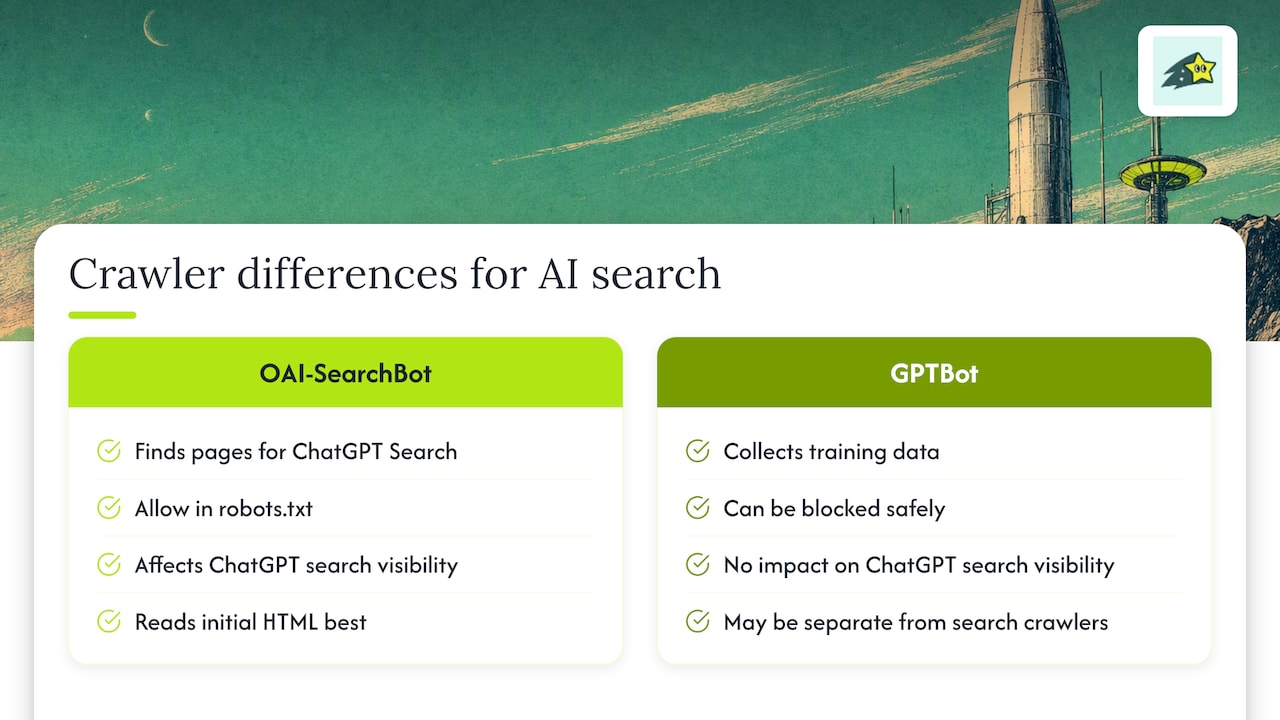
Two crawlers get confused often. OAI-SearchBot is what OpenAI uses to find and surface your pages in ChatGPT search results, so you want it allowed in robots.txt. GPTBot is a separate crawler used for training data collection, and you can block it without affecting your visibility in ChatGPT search. Treating these as the same bot leads teams to either block both (losing search visibility) or allow both without thinking it through (which may not match your content policy).
Structured data and rendering matter here too. If your price, availability, or product name only appears after JavaScript runs, a crawler that does not execute scripts sees an empty shell. Google Search Central specifically calls for Product structured data to be present in the initial HTML, not injected later, because merchant features depend on it being there when the page loads. The same logic applies broadly across AI search tools: what is not in the raw HTML often does not get read.
2. Prioritized technical checklist to get indexed
Work through these in order. Each step either removes a blocker or speeds up discovery.
- Audit robots.txt for OAI-SearchBot. Confirm it is allowed, not just GPTBot. Changes typically take about 24 hours to reflect in OpenAI's systems, so do not panic if nothing changes overnight.
- Check your CDN and WAF rules. Bot protection from providers like Cloudflare or Akamai can silently block legitimate crawlers even when robots.txt looks fine; OpenAI's own crawler guidance recommends validating this directly.
- Set up IndexNow. This gives Bing and other participating engines an instant notification when a URL changes, rather than waiting for a scheduled crawl. Our guide on Bing Webmaster Tools setup walks through the integration step by step.
- Keep your XML sitemap accurate, with canonical URLs and a real
lastmoddate, and make sure Product schema renders server-side. - Avoid client-side-only markup for price and availability. Use
noindexfor pages you genuinely do not want surfaced, and considernoarchivewhere you want to limit how deeply AI tools can ground answers in cached versions of your page. - Throttle bulk submissions. If you are re-indexing thousands of URLs after a catalog migration, send them in batches. Submitting everything at once risks triggering rate limits that slow down the whole queue.
Pro Tip: Fix your highest-revenue pages first. A perfectly indexed page that never sells is worth less than a slightly messy one that converts daily.
3. How to verify indexing and spot common failures
Checking that a change "worked" is where most teams get stuck. A few places to look:
- Bing Webmaster Tools has an IndexNow tab showing submission status and crawl history, useful for confirming your notifications are landing.
- Google Search Console's coverage report flags excluded pages and tells you why, whether it is a
noindextag, a canonical pointing elsewhere, or a server error. - Server logs reveal whether OAI-SearchBot is actually requesting your pages; cross-reference against the published user-agent and IP guidance rather than guessing from raw IP addresses, since OpenAI's documentation notes several user-agent strings can appear in logs.
- Firewall and CDN dashboards often log blocked requests separately from your main traffic, which is where a silent block usually hides.
The usual suspects behind a page not showing up: a disallowed path in robots.txt, a stray noindex, a canonical tag pointing to the wrong URL, a CDN rule blocking the crawler outright, or content that is too thin or duplicated to earn a spot.
OAI-SearchBot must be explicitly allowed in robots.txt for your pages to appear in ChatGPT search results at all, which makes this the single most common point of failure for ecommerce sites that have never reviewed their crawler rules.
Once you confirm a page is crawlable, tag it. ChatGPT automatically appends utm_source=chatgpt.com to referral links, so filtering for that string in your analytics tells you whether AI search is actually sending visitors, not just whether it indexed you.
4. Measuring revenue impact and attribution
Indexing work only matters if it moves revenue, so build the measurement layer alongside the technical fixes, not after.
- Track
utm_source=chatgpt.comand similar AI-specific tags, then map those sessions directly to completed orders rather than just pageviews. - Watch indexed impressions alongside AI-sourced sessions, conversion rate, and revenue per visit, since a page can get traffic without converting.
- Build funnels and conversion goals per product category so you can see where visitors drop off after arriving from an AI referral.
- Use per-URL revenue attribution to decide which pages deserve re-indexing effort first. A product page generating steady sales is worth fixing before a rarely visited category page.
In the first 30 days, watch for a rising count of AI-referral sessions alongside a conversion rate close to your site average. That is a signal the traffic is real and qualified, not noise from a crawler spike or bot traffic that never converts.
Pro Tip: Set a calendar reminder to review AI-referral revenue weekly for the first month. Early patterns tell you whether to expand your indexing effort or redirect it elsewhere.
5. A simple rollout plan from quick wins to ongoing ops
- Days 1 to 3: Check robots.txt, update sitemap
lastmoddates, confirm product pages render server-side, and add UTM tracking for AI referrals. - Weeks 1 to 3: Integrate IndexNow and, if you run high-volume catalog changes, a URL submission pipeline. Set up a monitoring dashboard and work with your infrastructure team on CDN and firewall allowlisting.
- Ongoing: Build a backlog of structured data fixes, content quality updates, and re-indexing priorities ranked by which pages actually generate revenue.
For agencies managing several client sites, assign clear ownership: a developer handles robots.txt, rendering, and firewall rules; a marketer owns UTM tagging and revenue review; someone on both sides checks the monitoring dashboard weekly. Our piece on forcing Google to recrawl a changed page is a useful reference when a single urgent update needs to jump the queue.
6. How AI algorithms influence ranking and indexing
AI-powered search tools do not just copy traditional ranking signals. They tend to weigh how directly a page answers a likely question, how well-structured the content is for extraction, and whether the source looks current and trustworthy. A page can rank well in Google while still getting skipped by an AI answer engine if the content is hard to parse into a clean, quotable answer.
This changes what "good SEO" means in practice. Keyword density matters less than having a clear, direct statement of the fact or answer near the top of a section. AI systems that generate answers from retrieved content tend to favor pages where the key claim is stated plainly, with supporting detail following rather than leading. For ecommerce pages, that often means leading product descriptions with the concrete fact (size, material, compatibility, price) rather than marketing language.
Freshness also plays a larger role than many teams assume. Bing's webmaster guidelines point to accurate sitemaps and crawl efficiency as factors that affect grounding and citation eligibility in AI experiences like Copilot, meaning a page that is technically indexed but stale may still lose out to a competitor's more recently updated version.
7. Writing content AI tools can actually understand
Semantic clarity beats keyword stuffing for AI retrieval. A product page that states its facts plainly, in complete sentences, gives an AI system less to interpret and fewer chances to misread intent.
A few techniques that help:
- Lead with the direct answer or fact (price, size, what it does) before the supporting narrative.
- Use descriptive headings that match how someone would actually phrase a question or search.
- Keep one topic per section instead of blending specs, shipping details, and reviews into a single block.
- Use structured data to reinforce what the visible text already says, never to state something the page text does not.
Consistency between your structured data, your visible copy, and your page title reduces ambiguity. When a product's name, price, and availability match exactly across all three, retrieval systems have less work to do and less room for error.
8. Why NLP matters for how your content gets indexed
Natural language processing is the layer that lets a search system understand what your page is actually saying, not just which words appear on it. It is how a crawler figures out that "running shoes" and "trainers" refer to the same product category, or that a page about "return policy" answers a question phrased as "can I send this back."
For ecommerce content, this means synonym and context handling matter more than exact-match keywords. Writing naturally, the way a customer would actually ask the question, tends to serve both human readers and the NLP layer better than forcing in a specific phrase repeatedly. Short, clear sentences also help, since dense or ambiguous phrasing is harder for any language model to parse into a confident answer. None of this requires special formatting beyond writing clearly and structuring pages so each section answers one clear question.
9. How user behavior signals shape AI-driven indexing
Search and AI systems do not only read your page. They also observe how people interact with it: whether visitors click through, how long they stay, and whether they bounce straight back to search. Over time, these behavioral signals can influence how much weight a page gets in both traditional rankings and AI-generated answers.
For ecommerce teams, this creates a practical incentive to fix pages that get traffic but fail to hold attention, since a page that visitors abandon quickly sends a weaker signal regardless of how well it is technically indexed. A fast-loading page with a clear answer near the top tends to perform better on this front simply because visitors get what they came for before leaving.
This is also where revenue tracking earns its place in the indexing conversation. A page with strong behavioral signals but no actual sales might be attracting the wrong audience, something you would only catch by connecting indexing data to conversion data rather than treating them as separate projects.
10. Indexing dynamic and personalized content without losing visibility
Dynamic pricing, personalized recommendations, and session-specific content create a real tension with indexing: crawlers need a stable, canonical version of the page to index, but your storefront might show different content to different visitors.
The practical fix is separating what changes per visitor from what stays constant for crawlers. Serve a canonical, server-rendered version with a representative price and standard availability to crawlers and first-time visitors, then layer personalization on top for logged-in or returning users. Avoid letting personalization logic alter the core product name, description, or price that structured data reports, since a mismatch between what a crawler sees and what a customer sees can both hurt indexing accuracy and create trust problems.
For pages that are genuinely too personalized to index meaningfully (a cart page, a personalized homepage feed), a noindex tag is the right call rather than letting a crawler try and fail to make sense of content that will not exist in that form tomorrow.
11. Closing the loop with AI-powered search analytics
Indexing and measurement work best as a continuous loop rather than a one-time project. Once a page is indexed and showing AI referral traffic, the next question is whether that traffic behaves differently from other channels, and whether it is worth the engineering time to expand.
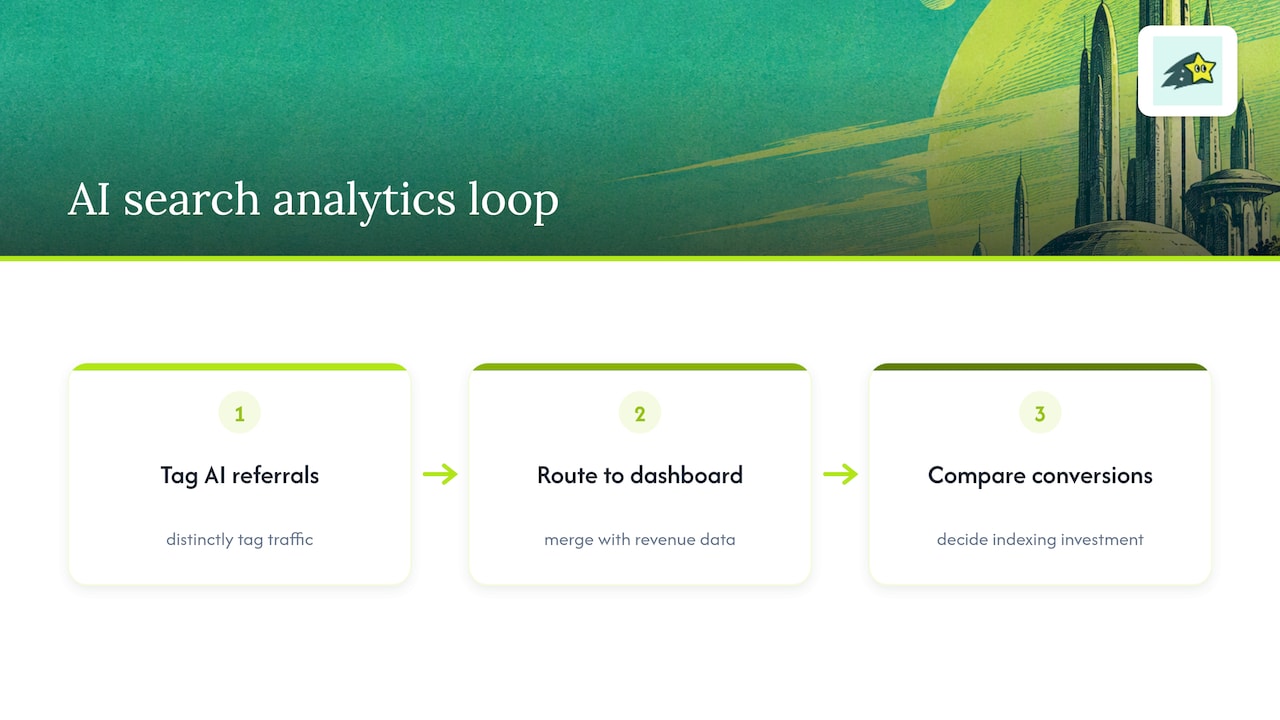
A workable feedback loop looks like this: tag AI referrals distinctly, route that data into the same revenue dashboard as your other channels, then use conversion differences to decide where to invest further indexing effort. Our guide on turning AI citations into revenue covers this from the measurement side in more detail, including how to connect citation visibility to actual sales rather than just traffic counts.
Why indexing deserves a revenue lens, not just an SEO one
Most indexing advice treats every page as equally worth fixing. In practice, a handful of pages drive most of your revenue, and those deserve your engineering time first. We built Cromojo around that idea: tracking revenue by URL so indexing and monitoring work can be prioritized by what actually sells, not just by what looks broken in a crawl report.
Cromojo: indexing, monitoring, and revenue in one dashboard
We built Automated Indexing to handle the technical side covered above: submitting and re-submitting URLs to Google, Bing, Yandex, Baidu, and AI search, so your team is not manually checking robots.txt every time a product page changes.
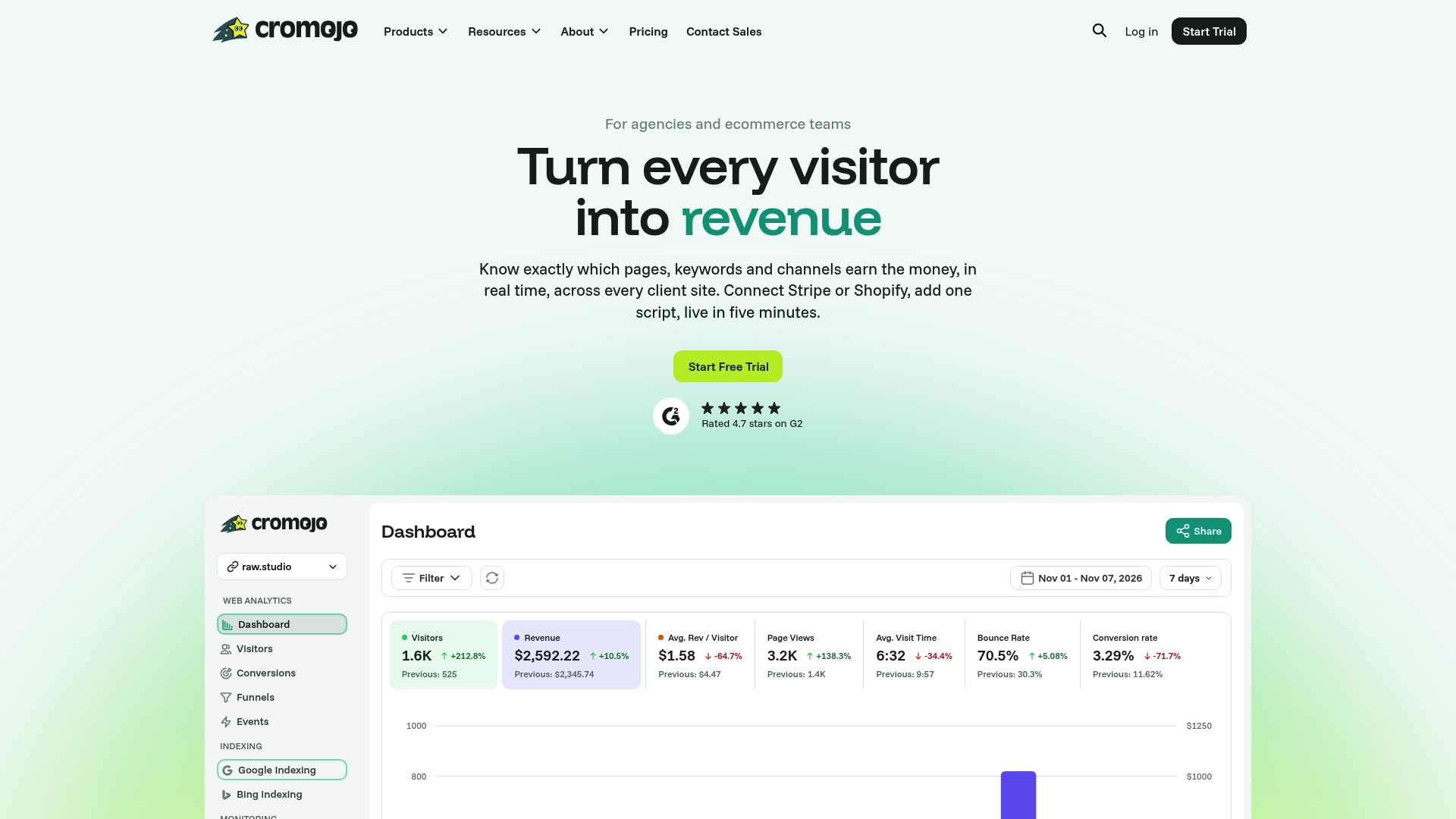
Alongside indexing, we give you:
- Real-time revenue attribution by page, keyword, and channel, connected directly to Stripe and Shopify.
- Website monitoring that flags downtime, errors, and SEO health issues before they cost you traffic.
- Cookieless, privacy-first tracking that sets up with a lightweight script on any stack.
If you want to see which of your pages are worth indexing first based on actual sales, check our pricing and start with the Free Plan or the Starter plan at an affordable monthly price.