
Use a lowercase, dash-separated, GA4-aligned UTM taxonomy with a single source-of-truth registry and automated builders. That one rule, applied consistently, prevents the fragmented channel data that quietly corrupts your ROAS signals and weekly marketing reports.
Two steps to apply this today:
- Copy the channel templates in Section 6 into a shared spreadsheet and lock the allowed values for
utm_sourceandutm_mediumbefore your next campaign launch. - Assign one person as UTM policy owner and point them to the governance rollout plan in Section 7.
The rest of this guide covers the naming models to choose from, a non-negotiable checklist, copy-paste templates for every major channel, and a troubleshooting playbook for cleaning up historical data.
What are the five UTM parameters and what does each track?
UTM parameters are query-string tags appended to a URL. They tell your analytics platform where a visitor came from, how they got there, and which specific creative or keyword drove the click. Google Analytics 4, and most other platforms, read these values directly from the URL at session start.
Here is what each parameter tracks, with a realistic example:
utm_medium— the marketing channel type (e.g.,cpc,email,organic-social). This is the "how." GA4's channel grouping readsutm_mediumdirectly, so incorrect values here cause misclassification.utm_campaign— the campaign name or ID (e.g.,2026-q2-product-launch). This is the "what."utm_term— the paid search keyword that triggered the ad (e.g.,utm+tracking+tool). Reserve this for paid search only; repurposing it for other channels pollutes keyword reporting.
A full tagged URL looks like this:
https://example.com/pricing
  ?utm_source=google
  &utm_medium=cpc
  &utm_campaign=2026-q2-product-launch
  &utm_term=utm+tracking+tool
  &utm_content=hero-cta-blue
The minimum viable set is three parameters: utm_source, utm_medium, and utm_campaign. Add utm_term for paid search and utm_content whenever you are running A/B creative tests or multiple placements within one campaign. Brafton's complete guide recommends treating the UTM policy as a living document so these definitions stay current as your channel mix evolves.
Which UTM naming model fits your team?
Three models dominate in practice. Choosing the right one depends on your team's size, tooling, and how much your analysts need to parse tags programmatically.
Cryptic IDs
Values are short, opaque codes tied to a registry (e.g., utm_campaign=c0042). The URL stays short and the registry is the single source of truth.
Pros: Compact URLs, easy to validate with a regex, no sensitive campaign names exposed in URLs. Cons: Unreadable without the registry, onboarding new team members is slow, and broken registry access means broken reporting.
Positional (fixed-order) strings
Values follow a fixed field order separated by a delimiter (e.g., utm_campaign=2026-q2-brand-awareness-us). Each position has a defined meaning: year, quarter, campaign type, audience.
Pros: Human-readable, self-documenting, easy to parse with a split function in SQL or Python. Cons: Long values, field-order discipline is hard to enforce manually, and adding a new field breaks historical parsing.
Key-value readable strings
Values use explicit key-value pairs within the parameter (e.g., utm_campaign=yr2026_q2_type-brand_geo-us). Each segment is labeled.
Pros: Highly readable, tolerant of field additions, good for warehouse parsing. Cons: Verbose, requires strict delimiter conventions, and is the hardest model to enforce without a builder tool.
Comparison at a glance
DimensionCryptic IDsPositional stringsKey-value stringsHuman readabilityLowMediumHighProgrammatic parsingEasy (lookup)Easy (split)Medium (regex)EnforceabilityHighMediumLow without toolingWarehouse-friendlyYesYesYes (with schema)Best forLarge teams, API-drivenMid-size teamsData-mature teams
Decision guidance: Small teams with manual tagging should use positional strings because they are readable without a registry and easy to audit in a spreadsheet. Large teams with ad-ops automation should use cryptic IDs for compactness and validation speed. Data-mature teams with a warehouse should consider key-value strings for their parsing flexibility.
Hybrid approaches work well in practice: use positional strings for utm_campaign (human-readable, datable) and cryptic IDs for utm_content (where creative variant codes are already tracked in your CMS or ad platform). When migrating from one model to another, Trackingplan recommends running both schemas in parallel for one full quarter before deprecating the old one, so historical comparisons stay intact.
Pro Tip: Pick the model your least-technical campaign manager can follow without looking up the rules. Complexity that requires a manual lookup every time is complexity that will be skipped under deadline pressure.
What are the non-negotiable UTM naming rules?
These rules apply regardless of which naming model you choose. Treat them as the floor, not the ceiling.
Core formatting rules
- Use hyphens as word separators within a value. Spaces encode as
%20in URLs and break readability. Underscores are acceptable but hyphens are the de facto standard for readability in reports. - Never add UTMs to internal links. Tagging links between your own pages resets the session source and overwrites the original attribution. This is one of the most common and damaging mistakes teams make, per DumbData's error audit.
Parameter-specific rules
utm_medium: Map to GA4 channel grouping expectations. Usecpcfor paid search,paid-socialfor paid social,emailfor email,organic-socialfor organic social posts,displayfor display/banner,affiliatefor partner links. GA4's channel grouping depends on these exact values.utm_campaign: — Semi-freeform but constrained by a naming pattern. Recommended pattern:{year}-{quarter}-{campaign-type}-{brief-descriptor}.
Reserved and forbidden values
- Never use
direct,website, ornoneas autm_sourcevalue. These collide with GA4's reserved channel definitions. - Never use
organicas autm_mediumfor paid campaigns. Reserve it for truly untagged organic traffic. - Avoid generic campaign names like
test,campaign1, ornew-campaign. They are impossible to interpret six months later.
UTM.io's 21-point checklist recommends documenting all allowed values in a shared location and using a builder tool that enforces exact values at link creation, so the rules are applied automatically rather than remembered manually.
Pro Tip: A simple validation regex like ^[a-z0-9][a-z0-9\-]*[a-z0-9]$ catches uppercase letters, spaces, and leading/trailing hyphens before a link goes live. Add it to your UTM builder or a pre-publish QA script.
Channel-by-channel UTM templates you can copy right now
These templates follow GA4 channel grouping conventions. Copy, adapt the bracketed fields, and paste into your registry.
Paid search
utm_source=google
utm_medium=cpc
utm_campaign=2026-q2-brand-search
utm_term={keyword}
utm_content=ad-variant-a
Note: Use {keyword} as a dynamic ValueTrack parameter in Google Ads for automatic keyword insertion. If you use Google Ads auto-tagging (gclid), the utm_term field is populated automatically and you can omit it from manual tags. Never add utm_term to non-search campaigns.
Paid social
utm_source=meta
utm_medium=paid-social
utm_campaign=2026-q2-retargeting-cart
utm_content=carousel-product-v2
Organic social
utm_source=linkedin
utm_medium=organic-social
utm_campaign=2026-q2-thought-leadership
utm_content=post-june-12
Email / newsletter
utm_source=mailchimp
utm_medium=email
utm_campaign=2026-q2-weekly-newsletter
utm_content=hero-cta
Partner / affiliate
utm_source=partner-acme
utm_medium=affiliate
utm_campaign=2026-q2-partner-launch
utm_content=banner-300x250
Display / video
utm_source=google
utm_medium=display
utm_campaign=2026-q2-awareness-display
utm_content=banner-728x90-v1
QR code / offline
utm_source=print-flyer
utm_medium=qr
utm_campaign=2026-q2-event-booth
utm_content=flyer-version-a
Default source/medium pairs by channel
Channelutm_sourceutm_mediumGA4 channel groupGoogle paid searchgooglecpcPaid SearchMeta paid socialmetapaid-socialPaid SocialLinkedIn paidlinkedinpaid-socialPaid SocialEmail newslettermailchimpemailEmailOrganic sociallinkedinorganic-socialOrganic SocialDisplay / bannergoogledisplayDisplayAffiliate / partnerpartner-nameaffiliateAffiliatesQR / offlineprint-flyerqrUnassigned*
*QR and offline channels do not map to a GA4 default group; create a custom channel definition in GA4 to capture them.
How do you operationalize UTM naming at scale?
Governance is what separates a team that cleans up UTM data quarterly from one that never has to. The goal is to move from "everyone remembers the rules" to "the system enforces the rules."
Registry schema
Your UTM registry is a shared spreadsheet or database table. At minimum, store these fields for every approved tag pattern:
source(allowed value from controlled list)medium(allowed value from controlled list)campaign_pattern(naming template, e.g.,{year}-{quarter}-{type}-{descriptor})campaign_id(optional, for warehouse cross-reference)owner(team member responsible for this campaign's tags)date_createdapproved_usage(channels and contexts where this pattern is valid)
Implementation rollout
- Automate: — Replace manual URL building with a UTM builder that reads from the allowed-values list. Tools like Google's Campaign URL Builder work for small teams; larger teams benefit from a custom spreadsheet formula or a dedicated builder that validates against the registry.
- Monitor: Set up a weekly site monitoring alert or GA4 custom report that flags new
utm_sourceorutm_mediumvalues not on the approved list. Catch drift before it compounds.
UTM.io's checklist and Trackingplan's guidance both converge on the same point: automation moves UTM governance from occasional cleanup to real-time quality control. The registry is the policy; the builder is the enforcement.
Ownership matters. Assign one person as UTM policy owner. Their job is to approve new values, update the registry, and run the weekly QA report. Without a named owner, the policy drifts within two campaign cycles.
Pro Tip: Version-control your UTM policy document. A simple "v1.2 — updated June 2026" header in the shared doc means teams always know which version is current and can audit when a value was added or changed.
What are the most common UTM mistakes and how do you fix them?
Most UTM problems fall into a small number of categories. Here is how to diagnose and remediate each one.
Diagnostic checklist
- Open your GA4 Traffic Acquisition report and filter by
Session source / medium. Look for capitalization variants of the same source (Google,google,GOOGLE). - Check for
(direct) / (none)sessions that spike after a campaign launch. This often means UTMs were stripped by a redirect or a link shortener. - Export raw event data from GA4 or your warehouse and run a
GROUP BY utm_sourcequery. Any value not on your approved list is a drift candidate. - Search for internal links tagged with UTMs by crawling your site with a tool like Screaming Frog. Internal UTMs reset session attribution and inflate source counts.
Retroactive cleanup vs. forward-fix
Retroactive cleanup (normalizing historical data in a warehouse export) is worth doing when you have more than three months of fragmented data and need accurate year-over-year comparisons. For shorter windows, a forward-fix (correct the taxonomy going forward, note the break in your reporting) is faster and less risky. Never modify raw event data in GA4 directly; work on exports or warehouse copies.
Monitoring to prevent recurrence
Set a recurring weekly task: export the previous week's new utm_source and utm_medium values and compare against the approved list. Any new value that is not on the list triggers a review. This takes under 10 minutes with a simple spreadsheet formula or a GA4 custom alert.
Appendix: glossary, validation rules, and starter schema
Glossary
TermDefinitionTaxonomy driftThe gradual accumulation of variant UTM values (different cases, spellings, delimiters) that fragment a single channel into multiple rows in reports.Channel groupingGA4's rule-based system that maps utm_medium values to named channel buckets (Paid Search, Email, Organic Social, etc.).Auto-taggingA platform feature (Google Ads gclid, Meta's URL parameters) that appends tracking data automatically, reducing the need for manual UTM tags on paid campaigns.utm_idAn optional parameter for storing a platform-assigned campaign ID, useful for cross-referencing ad platform data in a warehouse.Parsing rulesThe logic used to extract structured data from a UTM value string, typically a split-by-delimiter or regex pattern applied in SQL or Python.Controlled vocabularyA fixed, approved list of allowed values for a parameter, enforced at link creation to prevent taxonomy drift.
Validation regex for common rules
# Validates a single UTM value: lowercase, alphanumeric, hyphens only, no leading/trailing hyphens
^[a-z0-9]([a-z0-9\-]*[a-z0-9])?$

# Validates utm_campaign with date prefix (e.g., 2026-q2-product-launch)
^\d{4}-q[1-4]-[a-z0-9\-]+$
Starter registry schema
FieldExample valueNotessourcegoogleFrom approved list onlymediumcpcFrom approved list onlycampaign_pattern2026-q2-brand-searchYear-quarter-type-descriptorcampaign_idc0042Optional; for warehouse cross-referencecontent_labelhero-cta-blueCreative variant identifiertermutm+tracking+toolPaid search only; leave blank otherwiseownerjane.smithTeam member responsibledate_created2026-06-01standard date formatapproved_usagepaid-search, brand campaignsContexts where this pattern is validstatusactiveActive / deprecated / draft
What to store in the registry vs. the ad platform: The registry holds approved naming patterns, ownership, and audit history. The ad platform holds the actual live URLs and performance data. Your CRM holds the revenue outcomes. The registry is the bridge between them, not a replacement for either.
How do you validate that UTMs are producing reliable revenue attribution?
Clean UTM tags are only half the job. You also need to confirm that the attribution data flowing into your reports actually matches what happened in your CRM and ad platforms.
Validation checklist
- Verify Stripe or Shopify order attribution — If your ecommerce platform records the referral source at checkout, compare it against your analytics data. Discrepancies often point to session timeout issues or missing tags on late-funnel pages.
Reconciliation steps
- Export raw session data from your analytics platform, grouped by
utm_source,utm_medium, andutm_campaign. - Join against CRM or order data on session date and landing page URL.
- Flag rows where analytics shows sessions but CRM shows no conversions (possible tag stripping) and rows where CRM shows orders but analytics shows no sessions (possible attribution gap).
- Correct forward by fixing the UTM tags on affected URLs. Document the gap period in your reporting notes.
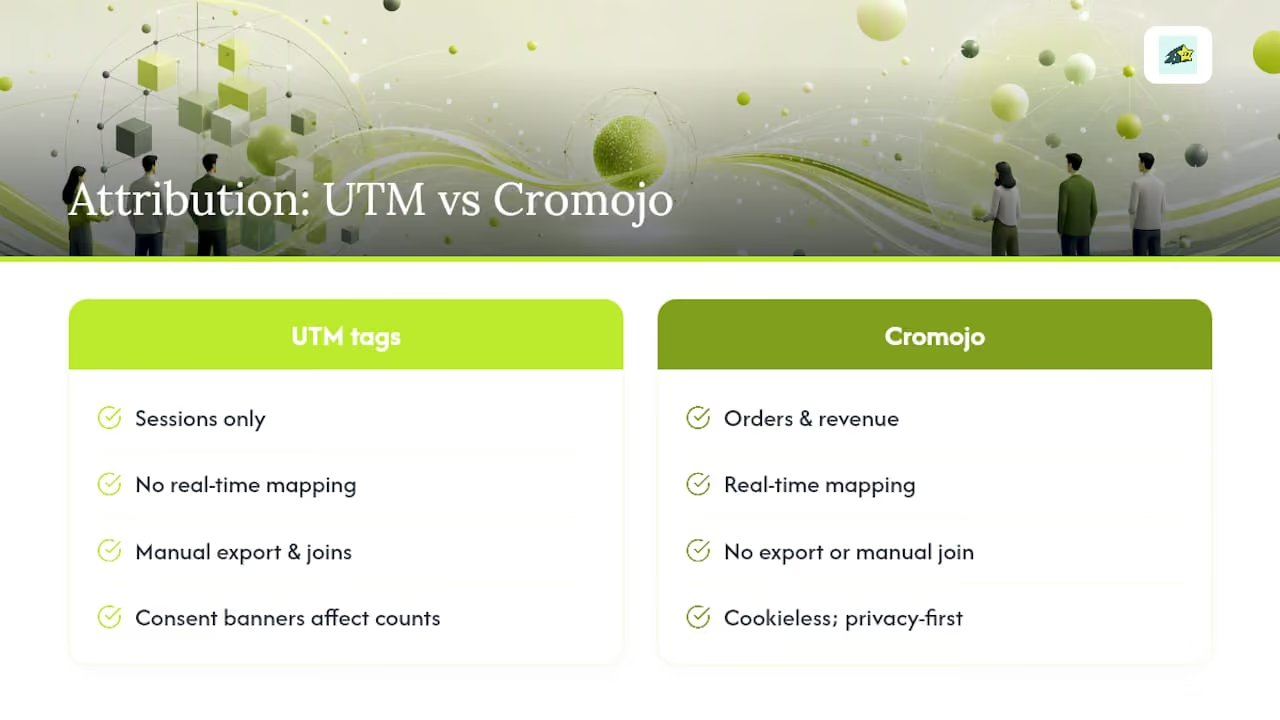
A revenue-first analytics platform shortens this loop considerably. When your analytics tool attributes revenue directly to UTM parameters in real time, rather than requiring a manual export-and-join workflow, you catch mismatches within hours of a campaign launch rather than at the end of the month. Cromojo's real-time revenue attribution connects UTM campaign data to actual Stripe and Shopify transactions, so the reconciliation step becomes a dashboard check rather than a spreadsheet exercise.
Key Takeaways
Consistent UTM naming conventions require a controlled vocabulary for source and medium, a dated campaign naming pattern, and a single registry owner who enforces the rules at link creation.
PointDetailsLowercase is the highest-impact rulePractitioner guidance highlights lowercase as the single most effective rule to reduce taxonomy drift, with an illustrative ~30% reduction.Map utm_medium to GA4 channel groupsUse cpc, email, paid-social, display, and affiliate to prevent channel misclassification and inflated "Unassigned" sessions.Date your campaign namesA pattern like 2026-q2-product-launch makes year-over-year comparisons reliable and prevents name collisions.Automate at link creationA builder that reads from an approved values list catches errors before links go live, not after data is already fragmented.Cromojo closes the attribution loopCromojo's real-time revenue attribution connects UTM campaign data to Stripe and Shopify orders, replacing manual reconciliation with a live dashboard.
The organizational pitfalls that actually break UTM programs
Most UTM governance failures are not technical. They are organizational.
The pattern repeats across teams of every size: someone writes a naming convention document, it gets shared once, and then it quietly stops being used. New campaign managers tag links from memory. Agencies apply their own conventions. A platform migration happens and nobody updates the registry. Within two quarters, the channel report is fragmented again.
Three specific failures drive most of this:
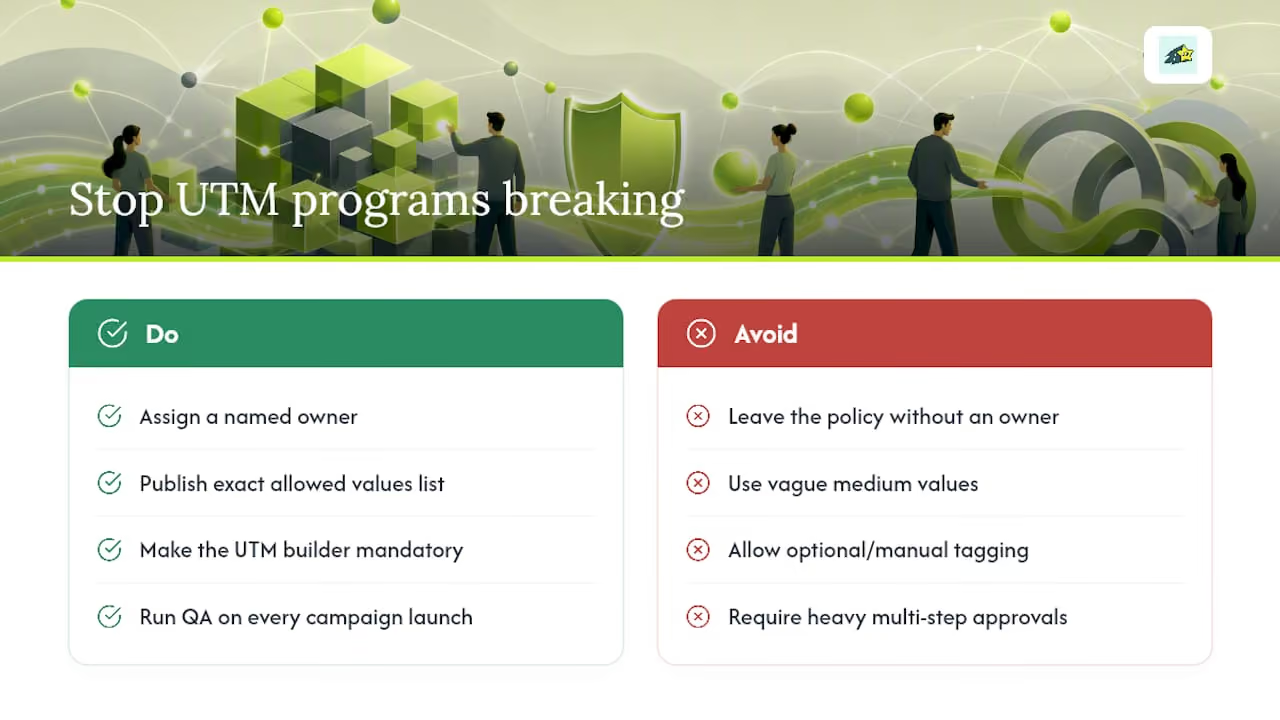
No named owner. A shared document with no owner is a document that nobody updates. The UTM policy needs one person whose job includes approving new values, running the weekly QA check, and updating the registry when a new channel or campaign type is added. This does not need to be a full-time role. It needs to be someone's explicit responsibility.
Ambiguous allowed values. "Social" or "paid" as medium values feel intuitive but do not map to GA4 channel definitions. Teams that leave medium values loosely defined end up with five variants of the same channel in their reports. The fix is to publish the exact allowed list, with the exact spelling, before the first campaign launches.
Builders that are optional. If your UTM builder is a nice-to-have that people use when they remember, it is not a governance tool. The builder needs to be the only way to create a tagged URL. That means removing the manual option from your campaign launch checklist and replacing it with a required builder step.
The quick wins that deliver the most impact in the first 30–60 days are straightforward: document the allowed values list, set up a builder that enforces it, and run a QA check on every campaign launch. Those three steps, done consistently, produce cleaner data than any retroactive cleanup project.
One cultural note: keep the tagging process lightweight. A governance system that requires five approvals and a 20-field form will be bypassed. A system that requires one builder, one registry entry, and one QA check will be followed. Compliance scales with simplicity.
Real-time revenue attribution starts where UTM tagging ends
Clean UTM tags tell you which channel drove a session. What they cannot do on their own is tell you which channel drove revenue, especially when your orders flow through Stripe or Shopify and your analytics live in a separate platform.
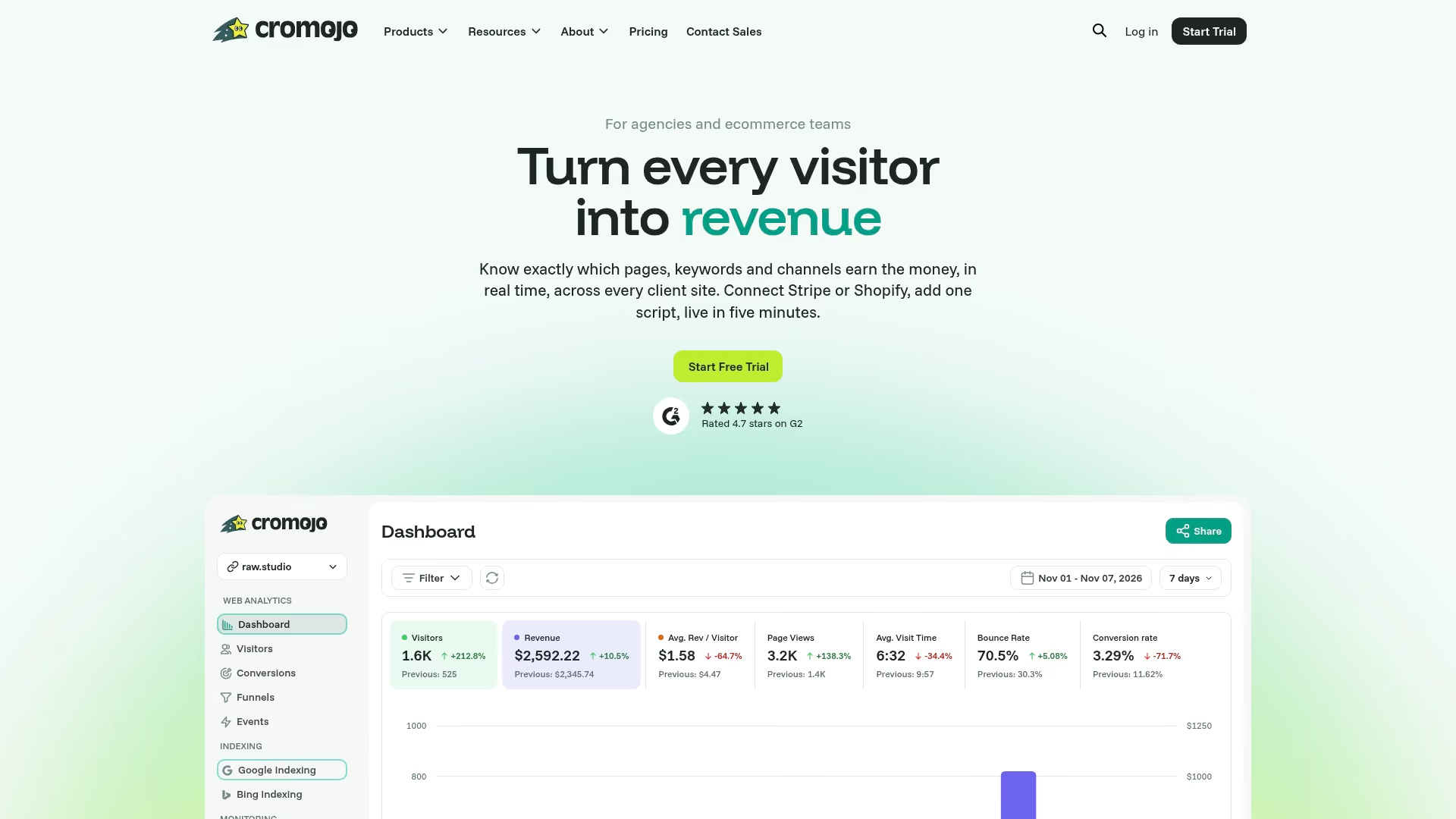
Cromojo connects those two sides directly. Its revenue attribution analytics maps UTM campaign data to actual transactions in real time, so you can see which utm_campaign values are generating orders, not just sessions. There is no end-of-month export, no manual join, and no guessing whether a spike in "Direct" traffic is a tagging gap or a genuine brand lift. The reconciliation step that typically takes hours becomes a dashboard view you can check before your weekly marketing report.
For teams that want a privacy-first alternative to GA4, Cromojo's cookieless tracking means attribution data stays accurate without consent banners affecting session counts. Setup takes minutes via a lightweight script, and the platform integrates with Shopify and Stripe out of the box.
Start a free trial at cromojo.com and connect your first campaign within the same day.
Useful sources and further reading
The sources below were used throughout this guide. Each one is worth bookmarking for specific needs:
- UTM Parameters: The Complete Guide for B2B SaaS Marketers (2026) | UTMStandard
- UTM Parameters Best Practices: 21-Point Checklist (2026) | UTM.io
- The 2026 UTM Tagging Guide: A Complete, Dated Reference for Marketing Teams - Terminus Blog
- 8 Essential UTM Parameter Best Practices for Flawless Tracking in 2026 | Trackingplan
- UTM Tracking Best Practices for Marketing Teams (2026)
- The Complete Guide to UTM Best Practices | Brafton
- 18 UTM Tagging Mistakes & Errors To Avoid (With Fixes) - DumbData
Starter template: Copy the registry schema from the Appendix section above into a Google Sheet. Add one tab for the allowed-values list (utm_source and utm_medium) and one tab for the campaign registry. Share it with your team and link it from your campaign launch checklist.
For advanced topics, the Terminus guide covers warehouse parsing patterns in detail. For multi-touch attribution beyond UTM-level data, Cromojo's revenue analytics features and the top analytics tools comparison are useful next reads.
Recommended
- The Secret SEO Booster You’re Ignoring: Uptime Monitoring Best Practices - Cromojo
- Website Monitoring Tool Agency Guide: How Agencies Manage Dozens of Sites Without Losing Control - Cromojo
- Cromojo Terms of Service
- Real User Monitoring: Complete Guide to Understanding User Experience - Cromojo