

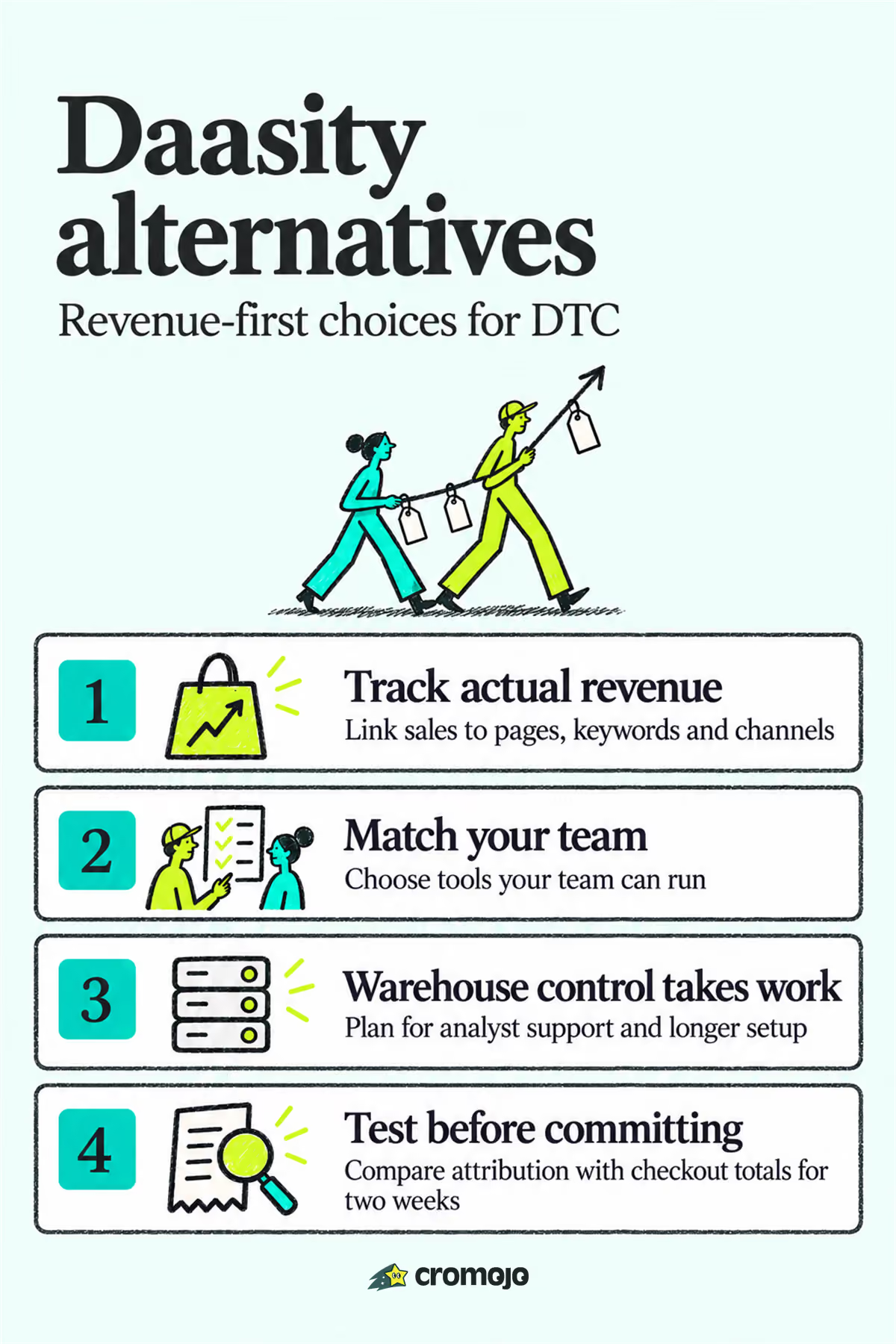
For most DTC teams, the strongest Daasity alternative is Cromojo if revenue attribution and fast setup matter more than a fully warehouse-native stack. Triple Whale suits Shopify-first operators who want self-serve dashboards, while Polar Analytics fits brands that already have analyst support and want warehouse ownership. The right pick depends on how much “data muscle” your team has, not which platform has the longest feature list.
What Are the Best Daasity Alternatives Right Now?
Daasity built its reputation as an omnichannel, warehouse-native analytics platform with pre-built dashboards for CPG brands, and that same post lists Peel, Polar, Tydo, Crisp, Bedrock, Fivetran, Northbeam, Triple Whale, and Glew.io as peers in the category. The market has only gotten more crowded since. CB Insights tracks additional names like Datavio and Source Medium competing for the same buyer job, which tells you something important: there’s no single “best” platform, only a best fit for your team’s setup and budget.
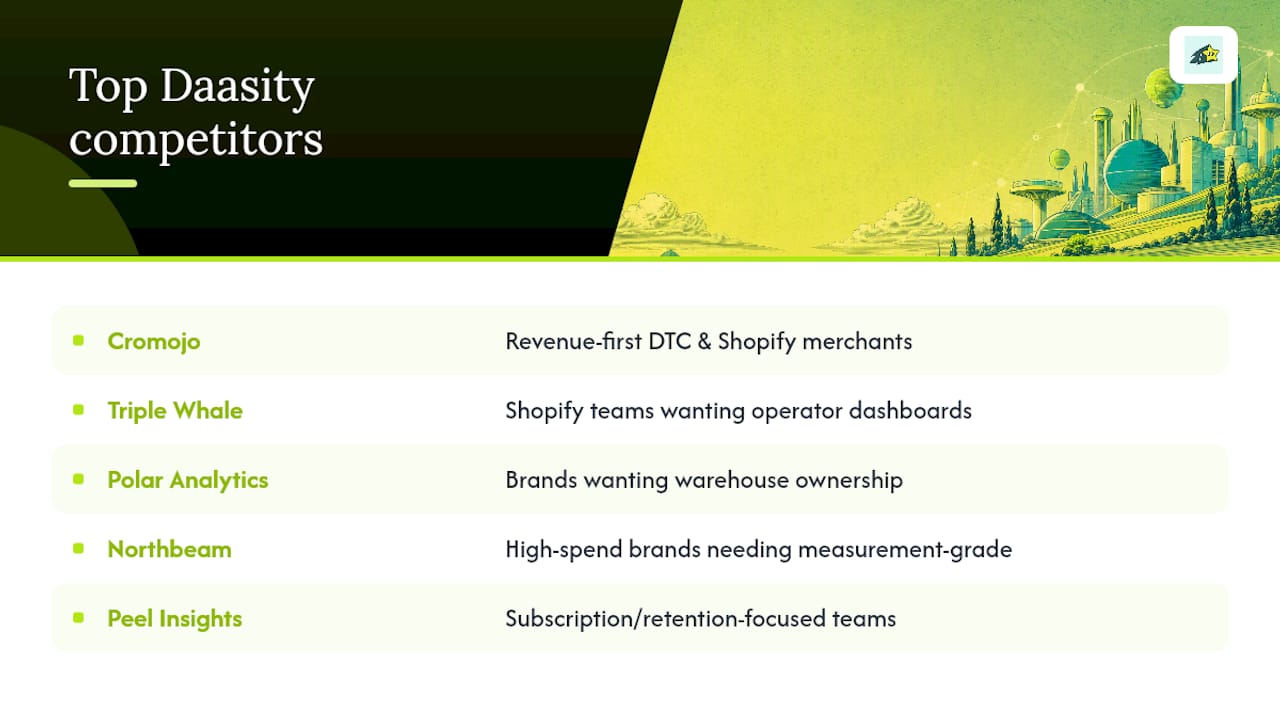
The most useful way to sort these options isn’t by feature count. It’s by how much analyst or engineering support your brand already has, a framing WiserReview’s comparison uses to split the field into self-serve tools and warehouse-native platforms. Here’s the shortlist:
Setup effort scales roughly with how much data ownership you want: self-serve tools like Triple Whale and Lifetimely connect in hours, while warehouse-native platforms like Polar or a Five-man-plus-Looker stack take days to weeks. Pricing follows a similar split. Some tools publish entry pricing publicly; Daasity itself is commonly cited around $1,899 per month in industry write-ups, which is part of why lighter self-serve alternatives get so much attention from growth-stage brands.
How Do the Top Daasity Competitors Compare?
Buyers evaluating DaaS platforms tend to focus on five things: what the tool actually does well, its standout feature, how long setup takes, what pricing looks like, and who it’s genuinely built for. Here’s how the field breaks down.
Cromojo is a revenue and web analytics platform built for ecommerce sites and agencies that want to know which pages, keywords, and channels actually generate sales, not just traffic. Its standout is real-time revenue attribution tied directly to Stripe and Shopify data, paired with cookieless tracking and automated site monitoring that flags downtime or indexing issues before they cost you revenue. Setup is lightweight: connect Shopify and Stripe, and attribution starts flowing without a data engineer. Pricing follows a straightforward tiered model based on pageviews and sites tracked, with a free trial to test attribution on a live campaign. Best for revenue-first DTC and Shopify merchants who want fast answers, not a warehouse project.
Triple Whale is built for Shopify-first operators who want an all-in-one dashboard without hiring an analyst. Its standout is a set of AI assistants layered on top of attribution and creative reporting, aimed at marketers who want a quick daily read on what’s working. Setup is fast, typically a day or two, and pricing scales with ad spend and store size. Best for teams that want operator-friendly dashboards over deep customization.
Polar Analytics gives each customer a dedicated Snowflake database along with a prebuilt ecommerce semantic layer, which means you get warehouse ownership without months of data engineering. Setup takes longer than a pure self-serve tool but far less than building a warehouse from scratch. Best for brands that want to own their data long-term and already have someone who can write SQL when needed.
Northbeam focuses on measurement-grade attribution for brands spending heavily on paid ads. Its standout is incrementality testing and multi-touch modeling built for teams that need to defend ad spend decisions with real numbers. Setup involves connecting ad platforms and validating attribution windows, which takes more calibration than a plug-and-play tool. Best for high-spend brands where a 5% attribution error means a real budget mistake.
Peel Insights automates cohort and retention analytics with ready-made LTV templates. Setup is quick once Shopify is connected, and the platform is priced for subscription and repeat-purchase brands. Best for teams whose growth strategy depends on retention curves, not just acquisition.
Looker is Google’s enterprise BI layer, built for teams that already run a warehouse and want a flexible semantic modeling tool on top of it. It’s not a quick-start product. Setup often takes weeks and requires a dedicated data or analytics engineer to build and maintain models. Best for enterprises with in-house data teams and complex reporting needs across departments, not lean DTC teams.
Mode targets analytics-literate teams that want notebook-style SQL exploration rather than fixed dashboards. Standout feature: flexible ad-hoc analysis for analysts who’d rather query than click through preset reports. Best for teams with a dedicated analyst who wants exploratory freedom.
Glew.io covers multichannel ecommerce reporting with a long list of prebuilt KPIs at a price point below most warehouse-native tools. Best for multi-store sellers who need broad integration coverage without a full data project.
Bedrock positions itself as a managed analytics partner, building brand-specific models rather than handing you a self-serve dashboard. Best for brands that want a hands-on analytics partner instead of managing the tool themselves.
Fivetran isn’t a dashboard tool. It’s an automated ELT pipeline that moves data from Shopify, Stripe, and ad platforms into your warehouse. Standout is a broad connector library and reliable replication. Best for teams that already have Looker, Mode, or a similar BI layer and just need clean pipes feeding it.
Lifetimely is built for speed. Setup for profit-and-LTV dashboards can be done same-day, and pricing is accessible for smaller Shopify and Amazon sellers. Best for sellers who want a fast financial read without a bigger analytics commitment.
d-lens applies agentic AI to audit ad and media performance and surface prescriptive action recommendations rather than raw dashboards. Best for teams that want automated audits flagging where ad spend is underperforming.
Finsi is a newer entrant surfaced in recent comparisons as a fast-start insight layer for ecommerce operators who want answers without a heavy engineering lift. Best for teams that want a lighter alternative to a full warehouse build.
Pro Tip: Before committing to any attribution-heavy tool like Northbeam or Triple Whale, run a single live campaign through it for two weeks and compare the attributed revenue against your platform’s own checkout data. Attribution windows and click models vary enough between vendors that the same campaign can show wildly different numbers.
How Do You Choose the Right Analytics Platform?
Run through this checklist before signing anything:
On a demo call, ask these five questions: What does onboarding look like in the first 30 days? Can we export our raw data and models if we leave? Can we see a sample dashboard from a store our size? Can you connect us with a reference customer in our category? What’s the exit clause if the contract isn’t working out? These map closely to the trust signals buyers should demand before signing: comparable reference stores, sample dashboard access, a documented onboarding plan, and a real export path.
Watch for these red flags: no sample dashboard available before you buy, vague answers about data export, pricing that changes after the first call, no named reference customer in your vertical, and a sales team that avoids specifics about attribution methodology.
Does Cromojo Fit Your Revenue Attribution Needs?
Cromojo maps directly onto the criteria above. Revenue attribution runs by keyword, page, and channel, connected straight to Shopify and Stripe data so you see which pages and campaigns actually convert, not just which ones drive clicks. Tracking is cookieless, which keeps you clear of consent friction while still attributing real sales. On top of revenue tracking, Cromojo runs automated site monitoring and SEO health checks, catching downtime or indexing problems that quietly cost conversions.
To test it properly, do this in order:
That sequence mirrors how most teams should evaluate any analytics platform, not just this one.
How Does Customer Support Compare Across These Platforms?
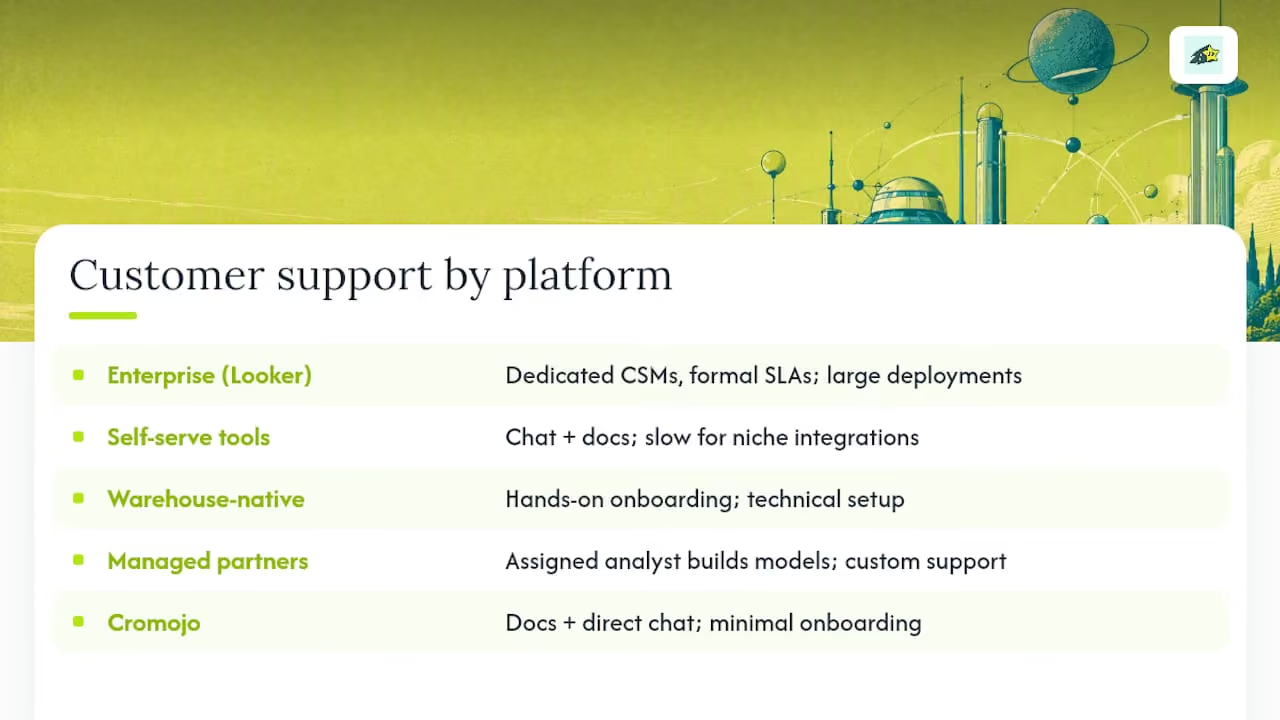
Support quality tends to track company size and pricing tier more than category. Enterprise tools like Looker come with dedicated customer success managers and formal SLAs, but that support is built for large accounts with complex deployments, not a fast answer to a single dashboard question. Self-serve tools like Triple Whale and Lifetimely lean on in-app chat and help docs, which works fine for straightforward setups but can leave you waiting on niche integration issues.
Warehouse-native platforms like Polar Analytics generally offer more hands-on onboarding since the initial setup is more technical. Managed partners like Bedrock go further still, pairing you with an analyst who builds your models directly, which trades self-serve speed for a genuinely custom support relationship.
Cromojo’s support model favors accessibility over hand-holding complexity: because the platform is designed to work without technical expertise, support primarily happens through documentation and direct chat rather than scheduled onboarding calls. That’s a meaningful difference if your team doesn’t have a dedicated analytics hire watching the tool full time.
Whatever platform you’re evaluating, ask specifically how support is staffed during your time zone and what response times look like for integration issues versus reporting questions. Vendors rarely volunteer that distinction unprompted, and it matters more once you’re live than it does during the sales call.
Can These Platforms Handle Growing Ecommerce Volumes?
Scalability breaks down differently depending on the architecture. Self-serve tools built on shared infrastructure, like Triple Whale, Glew.io, and Lifetimely, generally handle growing order volume well since they’re built to serve many merchants on shared systems. The tradeoff shows up in customization limits once you outgrow the standard dashboard templates.
Warehouse-native platforms scale differently. Polar Analytics gives each customer a dedicated Snowflake instance, so performance at high volume depends more on how well your queries and models are built than on shared infrastructure limits. That’s an advantage for brands processing millions of orders, but it also means performance is partly your team’s responsibility, not just the vendor’s.
Pipeline tools like Fivetran are built specifically for volume. Moving large datasets from Shopify, Stripe, and ad platforms into a warehouse reliably is the entire product, which is why brands that outgrow simpler tools often add Fivetran as infrastructure rather than replace their BI layer entirely.
Cromojo is built around real-time revenue tracking rather than batch processing, which matters most for brands that need same-day answers on campaign performance rather than next-day reports. For most growth-stage DTC brands, that real-time signal matters more than theoretical ceiling capacity you won’t hit for years. If your volume is already enterprise-scale with millions of monthly sessions, a warehouse-native or pipeline-based approach gives you more room to customize as you grow.
What Security and Compliance Standards Should You Expect?
Ecommerce data touches payment information, customer behavior, and sometimes personal identifiers, so compliance posture matters more than most feature comparisons acknowledge. Enterprise platforms like Looker, built on Google Cloud infrastructure, generally carry the broadest compliance certifications since they serve regulated industries beyond ecommerce.
Warehouse-native tools inherit much of their security posture from the underlying warehouse. Google’s BigQuery documentation describes a fully managed, serverless warehouse model with built-in encryption and access controls, which is one reason brands moving to warehouse-native platforms often cite security parity with their existing cloud stack as a deciding factor.
Smaller self-serve tools vary more widely in what they publish. Not every vendor in this category makes SOC 2 or GDPR documentation easy to find, so it’s worth asking directly rather than assuming coverage.
Cromojo’s cookieless tracking approach sidesteps a chunk of privacy compliance overhead by design, since it doesn’t rely on the consent mechanisms that cookie-based tracking requires. That doesn’t replace a full compliance review, but it does reduce one common friction point for teams selling into privacy-conscious markets. Whichever platform you’re evaluating, ask directly for current compliance documentation rather than trusting a marketing page’s blanket claims.
Which Platforms Are Easiest to Use Across Different Roles?
A platform that a data analyst loves can be unusable for a marketing manager who just wants Monday’s numbers, and that gap causes more tool abandonment than any missing feature. Enterprise tools like Looker and analyst-first platforms like Mode assume SQL literacy, which makes them powerful for data teams but frustrating for a founder who just wants a clean answer.
Self-serve platforms flip that priority. Triple Whale, Lifetimely, and Cromojo are all built so a marketing lead or founder can open a dashboard and get a straight answer without translating a query first. Cromojo’s interface specifically targets small and mid-sized ecommerce teams without dedicated analysts, which shows in how attribution and site health data get surfaced: as direct answers to “what’s working,” not raw tables waiting for someone to model them.
Warehouse-native tools like Polar Analytics sit in the middle. The prebuilt semantic layer makes dashboards accessible to non-technical users day to day, but someone still needs SQL comfort to build custom views when the standard reports fall short.
The practical test: have both your most technical team member and your least technical one try the same tool during a trial. If only one of them can navigate it, you’ve found the tool’s real audience, whatever the sales deck claims about ease of use.
What This Comparison Gets Right (and Where Most Guides Get It Wrong)
Most Daasity alternative roundups rank tools by feature checklists, which is close to useless. Feature lists are a wash once you get past the top five platforms in this category. What actually predicts whether a tool works for your team is the “data muscle” framing WiserReview uses: how much analyst and engineering support you already have, not what a spec sheet says.
The conventional advice tells brands to pick the platform with the most integrations or the flashiest AI features. That’s backwards. A brand with no analyst adopting a warehouse-native platform will spend three months fighting SQL models instead of reading revenue numbers. A brand with a data team choosing a rigid self-serve dashboard will hit a ceiling the moment they want a custom view.
The bigger blind spot in most comparisons is treating attribution and site health as separate problems solved by separate tools. They’re not. A campaign that drives traffic to a page that’s slow, unindexed, or intermittently down is a revenue problem disguised as a marketing problem. Most attribution-only tools never surface that connection. That’s precisely the gap a revenue-first, monitoring-aware platform is built to close, and it’s why revenue attribution paired with site health checks deserves more weight in this decision than most guides give it.
Prioritize matching the tool to your actual team capacity first. Everything else, integrations, dashboard polish, AI features, is a secondary filter once that fit is right.
Try Cromojo: What to Test Before You Commit
If the platforms above have you weighing self-serve speed against warehouse control, Cromojo gives you a third path: revenue attribution and site health in one lightweight setup, without choosing between fast and thorough. You get real-time attribution by keyword, page, and channel, plus automated monitoring that flags downtime or indexing issues before they quietly drain conversions.
Testing it takes one afternoon, not a procurement cycle. Connect Shopify and Stripe, pick one live campaign, and check whether the attributed revenue lines up with your actual checkout totals. While you’re in there, glance at the site monitoring dashboard to see if any pages are throwing errors or slipping out of search index, problems that cost revenue long before anyone notices them in a standard analytics report.
Start with the Revenue Attribution Analytics page to see how attribution is built, or check Website & Uptime Monitoring if site health checks are your bigger gap right now. Either page gets you into a free trial in a few minutes, with no analyst required to get your first answer.